
Free Google Sheets survey template
Put your survey responses in, one row per person, and the summary counts every answer, works out the percentages and averages the ratings. It's laid out the way Google Forms fills a sheet, so you can link a form straight to it. The sample is a fitness studio's class feedback survey.
Pro Want every question summarized, with group comparisons and a printable report? See Survey Results Pro →| Timestamp | Which class did you take? | How did you hear about us? | How satisfied were you with the class? (1-5) | How would you rate your instructor? (1-5) | How likely are you to recommend us to a friend? (0-10) | Will you book another class? | What could we do better? |
|---|---|---|---|---|---|---|---|
| Nov 2, 2026 | Yoga | Friend or family | 5 | 5 | 10 | Yes | |
| Nov 2, 2026 | Spin | 4 | 5 | 9 | Yes | More evening times | |
| Nov 3, 2026 | HIIT | Google search | 3 | 4 | 6 | Maybe | Room was too warm |
| Nov 3, 2026 | Yoga | Walked by | 5 | 5 | 9 | Yes | |
| Nov 4, 2026 | Pilates | 4 | 4 | 8 | Yes | Mats could be cleaner | |
| Nov 4, 2026 | Spin | Friend or family | 5 | 5 | 10 | Yes | |
| Nov 5, 2026 | HIIT | 2 | 3 | 4 | No | Too crowded, hard to see the instructor | |
| Nov 5, 2026 | Yoga | Google search | 4 | 5 | 9 | Yes | Parking is tricky |
| Nov 6, 2026 | Pilates | Friend or family | 5 | 5 | 10 | Yes | |
| Nov 7, 2026 | Spin | Google search | 4 | 4 | 7 | Maybe | Bikes need adjusting |
| Nov 7, 2026 | Yoga | 5 | 4 | 9 | Yes | ||
| Nov 8, 2026 | HIIT | Friend or family | 4 | 5 | 8 | Yes | Longer cool-down please |
| Nov 9, 2026 | Pilates | Other | 3 | 3 | 6 | Maybe | Felt rushed at the start |
| Nov 9, 2026 | Spin | 5 | 5 | 10 | Yes | ||
| Nov 10, 2026 | Yoga | Walked by | 4 | 4 | 8 | Yes | Quieter music |
| Nov 11, 2026 | HIIT | Google search | 3 | 4 | 7 | Maybe | More beginner options |
| Nov 12, 2026 | Pilates | 5 | 5 | 9 | Yes | ||
| Nov 12, 2026 | Spin | Friend or family | 4 | 5 | 9 | Yes | |
| Nov 13, 2026 | Yoga | Google search | 5 | 5 | 10 | Yes | Nothing, loved it |
| Nov 14, 2026 | HIIT | 4 | 4 | 8 | Yes |
| Question | Answer | Count | Share |
|---|---|---|---|
| All questions | Responses | 20 | |
| Which class did you take? | Yoga | 6 | 30% |
| Which class did you take? | Spin | 5 | 25% |
| Which class did you take? | HIIT | 5 | 25% |
| Which class did you take? | Pilates | 4 | 20% |
| How did you hear about us? | 7 | 35% | |
| How did you hear about us? | Google search | 5 | 25% |
| How did you hear about us? | Friend or family | 5 | 25% |
| How did you hear about us? | Walked by | 2 | 10% |
| How did you hear about us? | Other | 1 | 5% |
| How satisfied were you with the class? (1-5) | Average (out of 5) | 4.15 | |
| How satisfied were you with the class? (1-5) | 5 | 8 | 40% |
| How satisfied were you with the class? (1-5) | 4 | 8 | 40% |
| How satisfied were you with the class? (1-5) | 3 | 3 | 15% |
| How satisfied were you with the class? (1-5) | 2 | 1 | 5% |
| How satisfied were you with the class? (1-5) | 1 | 0 | 0% |
| How would you rate your instructor? (1-5) | Average (out of 5) | 4.45 | |
| How likely are you to recommend us to a friend? (0-10) | Average (out of 10) | 8.3 | |
| How likely are you to recommend us to a friend? (0-10) | Promoters (9-10) | 11 | 55% |
| How likely are you to recommend us to a friend? (0-10) | Passives (7-8) | 6 | 30% |
| How likely are you to recommend us to a friend? (0-10) | Detractors (0-6) | 3 | 15% |
| How likely are you to recommend us to a friend? (0-10) | Net Promoter Score | 40 | |
| Will you book another class? | Yes | 15 | 75% |
| Will you book another class? | Maybe | 4 | 20% |
| Will you book another class? | No | 1 | 5% |
| What could we do better? | Written answers | 11 | 55% |
| Class | Responses | Avg satisfaction | Avg instructor | Avg recommend | Would book again |
|---|---|---|---|---|---|
| Yoga | 6 | 4.67 | 4.67 | 9.2 | 100% |
| Spin | 5 | 4.4 | 4.8 | 9 | 80% |
| HIIT | 5 | 3.2 | 4 | 6.6 | 40% |
| Pilates | 4 | 4.25 | 4.25 | 8.3 | 75% |
What's inside
- A responses tab laid out like Google Forms output: timestamp first, one column per question
- Answer counts and percentages for every multiple-choice question
- Average ratings plus a 1 to 5 breakdown, so you can see the spread, not just the average
- A Net Promoter Score from a 0 to 10 recommend question
- A breakdown tab that compares ratings across groups, like each class
- Formulas that cover 2,000 rows, so new responses are counted as they arrive
How to use it
Download your copy
Click "Free download" to save the .xlsx file. It opens in Excel, or in Google Sheets: open a blank sheet (sheets.new) and choose File, then Import, then Upload. The sample has 20 responses to a class feedback survey.
Set your questions
Change the column headers on Form Responses 1 to your questions, in the same order as your form. On the Summary tab, change the questions and answer options to match, spelled exactly as in your form.
Get responses in
Paste exported responses into Form Responses 1, one row per person. Or link a Google Form: in the form, open Responses, choose Link to Sheets, then Select existing spreadsheet and pick your copy.
Point the summary at your form
Linking adds a new responses tab, usually called Form Responses 2. Press Ctrl+H, find 'Form Responses 1', replace it with 'Form Responses 2', tick Also search within formulas and click Replace all. Then delete the sample tab.
Read the results
The Summary tab updates as each response comes in. Use the By Class tab, or change it to another question, to compare groups.
Tips
Keep answer options fixed
Use multiple choice or dropdown questions where you can. Free-text answers like "insta" and "Instagram" get counted separately.
Add a chart
Select a block of answers and counts on the Summary tab, then choose Insert, then Chart. A bar chart is usually easiest to read.
Read the written answers too
Counts tell you what, comments tell you why. Sort the What could we do better column and look for the same complaint showing up again and again.
Don't change the responses tab layout
Google Forms writes to fixed columns. Add your own notes or formulas on a separate tab, not between the form's columns.
Questions
Can I make a survey in Google Sheets?
Google Sheets is best for collecting and analyzing the answers. Build the questions in Google Forms, link the form to this sheet, and every response lands here as a new row that the summary counts automatically.
How do I link Google Forms to this template?
Open your form, go to the Responses tab, choose Link to Sheets, then Select existing spreadsheet and pick your copy of this template. Google adds a new responses tab. Then use Find and replace in formulas so the Summary reads from it, as in the steps above.
How do I count checkbox questions with several answers?
Google Forms puts all the ticked answers in one cell, separated by commas. Use a formula like =COUNTIF(B:B,"*Yoga*") to count every response that includes Yoga.
What is a Net Promoter Score?
It comes from a 0 to 10 "how likely are you to recommend us" question. The share of 9s and 10s minus the share of 0s to 6s gives a score from -100 to 100. Higher is better.
Can I use it in Excel?
Yes. Download the .xlsx file and paste your responses in. The counts, averages and score all work in Excel. Linking to Google Forms only works in Google Sheets.
Is my survey data private?
Your copy lives on your computer or in your own Google Drive, and only people you share it with can see it. We never see your responses.
Pro version
Survey Results Pro
Paste in your Google Forms responses and get a summary of every question, group comparisons, a comments list and a report you can print.
Paste in your responses
The Responses tab is laid out like the sheet Google Forms makes, so you can copy your responses straight in. Up to 30 questions and 500 people.
Every question summarized
It looks at each question's answers and sets it up as multiple choice, checkboxes, a rating, NPS, a number or written answers. If it guesses wrong, change it from a dropdown.
Counts, averages and NPS
Choice questions get counts and percentages. Ratings get the average, the spread and the share at the top of the scale. NPS shows promoters, passives, detractors and the score.
Compare groups
Split the results by any question, like location or age band. You'll see each group's scores and a cross-tab, with the big differences in color.
Read every comment in context
Comments shows the written answers to one question, with each person's group and score next to them. Type a word to see only the comments that mention it.
A report ready to share
Results lays out every question with counts, percentages and bars, ready to print or save as a PDF for your team, board or client.
| Free | Pro |
|---|---|
| Summary for one sample survey | Works out every question for any survey you paste in |
| Counts, % and average ratings | Plus spread, top-of-scale %, NPS and number stats |
| Type answer lists by hand | Finds the answers for you, or keeps your own order |
| · | Dashboard with response rate and charts |
| · | Compare groups and cross-tab any question |
| · | Comments listed with each person's group and score |
| · | Printable results report |
| · | Report on a date range or one round of the survey |
$19 one-time
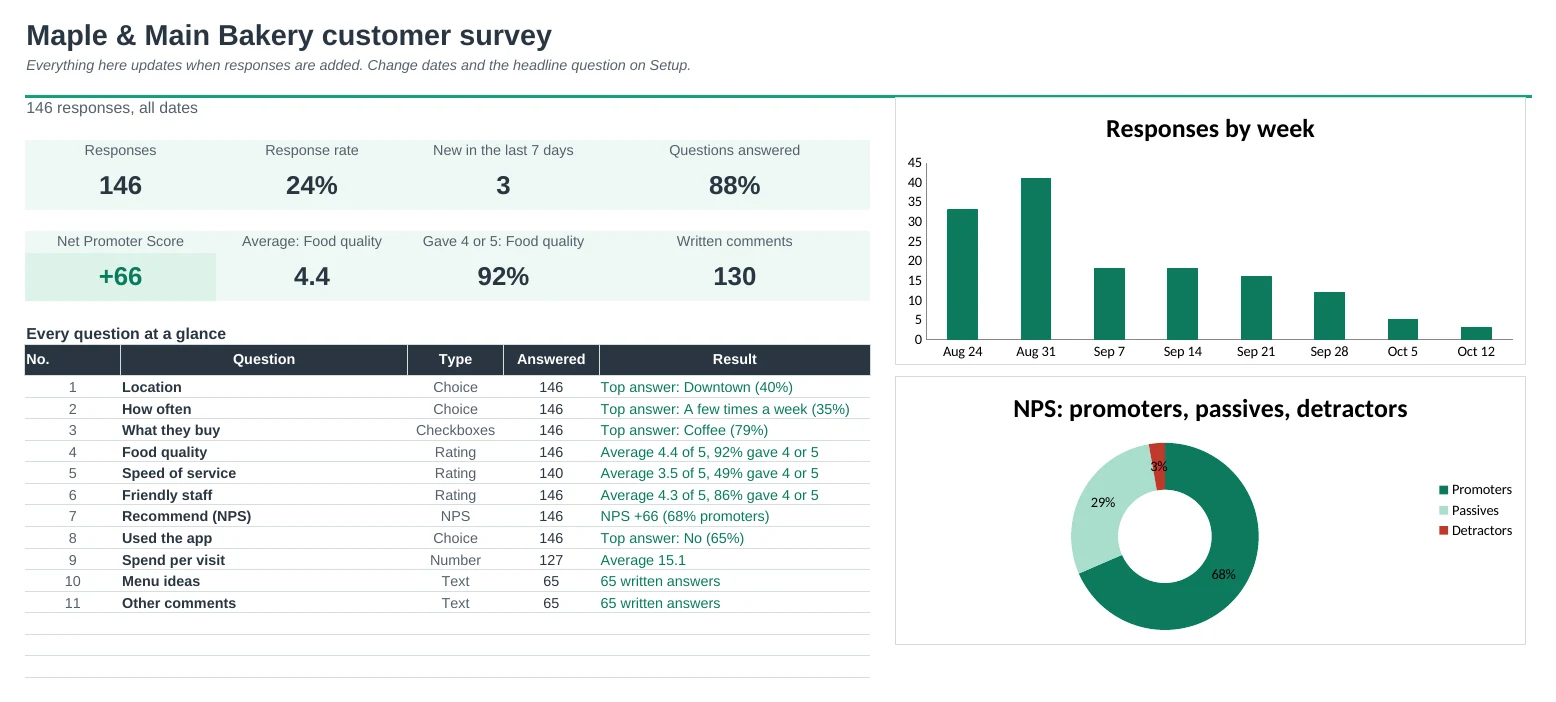
7 tabs: Start Here, Dashboard, Responses, Results, By Group, Comments and Setup. You get two copies: one filled in with a sample bakery customer survey so you can see it working, and a blank one ready for your own responses.
Get Survey Results Pro for $19- Instant download after checkout
- Works in Google Sheets and Excel
- Yours to keep and reuse every year