
Free social media calendar template for Google Sheets
Plan every post in one list: when it goes out, where, what it's about and the caption. Set each post's status as it moves from idea to posted, and the sheet flags anything overdue or still unfinished a few days before it's due. Summary tabs count posts by platform and content pillar so you can see if your mix is balanced.
Pro Want a month calendar, recurring slots and engagement by pillar and platform? See Social Media Calendar Pro →| Date | Day | Time | Platform | Format | Pillar | Topic | Caption | Status | Owner | Post link | Engagement | Check |
|---|---|---|---|---|---|---|---|---|---|---|---|---|
| Nov 2, 2026 | Mon | 8:00 AM | Photo | Product | Pumpkin loaf is back | It's back. Pumpkin loaf, every morning until Thanksgiving. What's your go-to fall bake? | Posted | Sam | instagram.com/p/example1 | 412 | Posted | |
| Nov 2, 2026 | Mon | 12:00 PM | Photo | Product | Pumpkin loaf is back | Our pumpkin loaf is back on the shelf from today. Come grab a slice with your coffee. | Posted | Sam | facebook.com/example1 | 96 | Posted | |
| Nov 3, 2026 | Tue | 6:00 PM | TikTok | Video | Behind the scenes | 4 a.m. bread shift | What 4 a.m. looks like when you bake for a living. | Posted | Jo | tiktok.com/@example/1 | 2,350 | Posted |
| Nov 4, 2026 | Wed | 10:00 AM | Photo | Tips | How to store bread | Keep your loaf fresh for days: the paper bag trick and when to freeze. | Posted | Sam | pinterest.com/pin/example1 | 58 | Posted | |
| Nov 5, 2026 | Thu | 8:00 AM | Carousel | Tips | 5 cookie mistakes | Flat cookies? Dry cookies? Swipe for the 5 most common mistakes and how to fix them. | Posted | Jo | instagram.com/p/example2 | 688 | Posted | |
| Nov 6, 2026 | Fri | 5:00 PM | Event | Community | Saturday kids' decorating class | Kids' cookie decorating class this Saturday at 10. Six spots left. Sign up in store. | Posted | Sam | facebook.com/example2 | 143 | Posted | |
| Nov 7, 2026 | Sat | 9:00 AM | Story | Community | Decorating class photos | Look at these little decorators! | Posted | Sam | 87 | Posted | ||
| Nov 8, 2026 | Sun | 11:00 AM | TikTok | Video | Product | Croissant cross-section | 72 hours, 27 layers. Here's why our croissants take three days. | Drafting | Jo | Overdue | ||
| Nov 9, 2026 | Mon | 8:00 AM | Reel | Behind the scenes | Meet our new baker | Say hi to Luis, our new morning baker. Ask him anything in the comments. | Scheduled | Jo | This week | |||
| Nov 10, 2026 | Tue | 12:00 PM | Photo | Promo | Thanksgiving pie pre-orders | Thanksgiving pies are open for pre-order: apple, pecan and pumpkin. Order by Nov 20. | Ready | Sam | This week | |||
| Nov 10, 2026 | Tue | 6:00 PM | Carousel | Promo | Thanksgiving pie pre-orders | Three pies, one holiday. Pre-order by Nov 20, link in bio. | Ready | Sam | This week | |||
| Nov 11, 2026 | Wed | 10:00 AM | Photo | Tips | Pie crust that doesn't shrink | Our head baker's three rules for a pie crust that holds its shape. | Drafting | Jo | Needs work | |||
| Nov 12, 2026 | Thu | 8:00 AM | Photo | Product | Cranberry orange scones | Idea | Sam | Needs work | ||||
| Nov 13, 2026 | Fri | 5:00 PM | TikTok | Video | Behind the scenes | Packing 200 pie boxes | Pie season prep, sped up. | Idea | Jo | This week | ||
| Nov 14, 2026 | Sat | 9:00 AM | Text post | Community | Food drive drop-off | We're a drop-off point for the Riverside food drive until Nov 25. | Ready | Sam | This week | |||
| Nov 16, 2026 | Mon | 8:00 AM | Reel | Tips | Proofing dough at home | Your kitchen is too cold for bread. Here's the oven-light trick. | Idea | Jo | This week | |||
| Nov 18, 2026 | Wed | 12:00 PM | Photo | Promo | Last call for pie orders | Two days left to pre-order Thanksgiving pies. | Idea | Sam | Later | |||
| Nov 18, 2026 | Wed | 6:00 PM | Photo | Product | Thanksgiving dessert table | Idea | Sam | Later | ||||
| Nov 20, 2026 | Fri | 8:00 AM | Story | Promo | Pie orders close today | Last chance! Pie orders close at 6 p.m. | Idea | Sam | Later | |||
| Nov 21, 2026 | Sat | 11:00 AM | TikTok | Video | Community | Customer taste test | Idea | Jo | Later |
| Platform | Planned | Posted | Ready or scheduled | Idea or draft | Needs attention | Avg engagement |
|---|---|---|---|---|---|---|
| 8 | 3 | 2 | 3 | 1 | 396 | |
| 5 | 2 | 2 | 1 | 0 | 120 | |
| TikTok | 4 | 1 | 0 | 3 | 1 | 2,350 |
| 3 | 1 | 0 | 2 | 1 | 58 | |
| All platforms | 20 | 7 | 4 | 9 | 3 | 548 |
| Pillar | Posts | Share | Posted | Avg engagement |
|---|---|---|---|---|
| Product | 5 | 25% | 2 | 254 |
| Behind the scenes | 3 | 15% | 1 | 2,350 |
| Tips | 4 | 20% | 2 | 373 |
| Community | 4 | 20% | 2 | 115 |
| Promo | 4 | 20% | 0 |
| Setting | Value | Notes |
|---|---|---|
| Today's date | Nov 9, 2026 | Type today's date, or =TODAY() to keep it current. The Check column uses it |
| Posts this month | 20 | Posts dated in the same month as today's date |
| Posts in the next 7 days | 7 | |
| Need work before posting | 3 | Overdue, or due within 3 days and still an idea, a draft or missing a caption |
What's inside
- One row per post with date, day, time, platform, format, pillar, topic, caption, owner and link
- A Check column that flags posts that are overdue or still unfinished 3 days out
- Counts by platform: planned, posted, ready and still in progress
- A content pillar breakdown showing what share of your posts each theme gets
- Average engagement per platform and pillar, once you log likes, comments or shares
- Works in Google Sheets and Excel, with no account or add-on needed
How to use it
Download your copy
Click "Free download" to save the .xlsx file. It opens in Excel, or in Google Sheets: open a blank sheet (sheets.new) and choose File, then Import, then Upload. The sample shows a small bakery's November posts.
Set your platforms and pillars
Rename the platforms on the By Platform tab and the pillars on the By Pillar tab to the ones you use. Pillars are the three to five themes you post about again and again.
Plan your posts
Add one row per post on the Content Calendar tab. Fill in the date, time, platform and topic first. Captions can come later.
Move each post along
Change Status as you go: Idea, Drafting, Ready, Scheduled, then Posted. Spell them the same way each time so the counts work.
Keep today's date current
On the Settings tab, type today's date or enter =TODAY(). The Check column then shows what's overdue, what needs work and what's coming up this week.
Log results
After a post goes out, paste its link and add an engagement number, like likes plus comments. The summary tabs average them so you can see what works.
Tips
Sort by the Check column
Once a week, filter the Check column to Overdue and Needs work. That is your to-do list for the next few days.
Reuse one idea across platforms
One topic can be a Reel on Instagram, a photo post on Facebook and a pin on Pinterest. Give each its own row so each gets its own status.
Keep your mix balanced
If Promo is more than about a quarter of your posts on the By Pillar tab, followers may start tuning out. Add more tips and behind-the-scenes posts.
Pick one engagement measure
Use the same measure for every post, such as likes plus comments. Mixing measures makes the averages meaningless.
Questions
How do I make a social media calendar in Google Sheets?
Download this template, then add one row per post with its date, platform, topic and caption. Use the Status column to track each post from idea to posted. The summary tabs fill themselves in.
Can I use this as a content calendar or editorial calendar?
Yes. Change the platforms to channels like Blog, Newsletter or YouTube and use the Topic and Caption columns for titles and outlines. The status tracking and counts work the same way.
Can I see my posts on a monthly calendar grid?
This template is a list, which is easier to sort, filter and share. If you want a grid view, sort the list by date and keep it open next to a monthly calendar template, or filter by the week you're working on.
Does it post to social media for me?
No. It's a planning sheet. You still publish posts yourself or with a scheduling tool, then mark them Posted here.
How do I add a new platform?
Type the platform name in a post's Platform column, then add the same name as a new row on the By Platform tab and copy the formulas down from the row above.
Can my team use it together?
Yes. Share your Google Sheets copy with your team and give each person edit access. Use the Owner column so everyone knows which posts are theirs.
Pro version
Social Media Calendar Pro
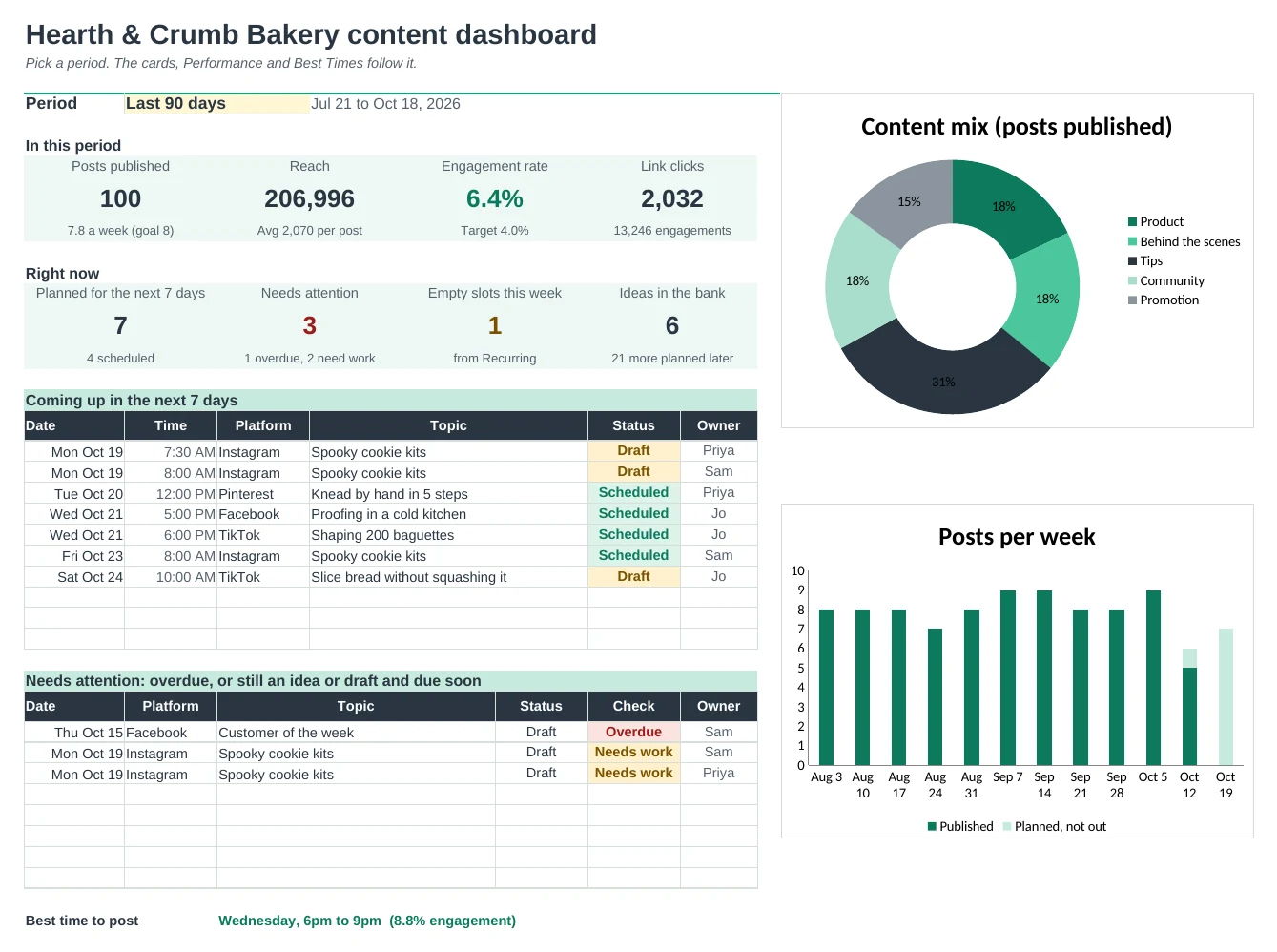
Plan every post from idea to posted, see the month at a glance, and learn which pillars, platforms and times get the most engagement.
Plan in one list
Every post goes on one Posts tab with its date, platform, pillar, campaign and status. Ideas without a date wait in an idea bank until you're ready.
See the whole month
Pick a month and every post lands on its day in a calendar grid, coloured by status: idea, draft, scheduled or posted. It prints on one page.
Keep your weekly rhythm
Set up recurring slots like Tip Tuesday or a Friday special. Each one shows its next four dates and turns amber when nothing is planned.
Know what works
Type reach and reactions once a post is out. Performance shows engagement rate by pillar and platform, your content mix against your plan and your top posts.
Find your best times
Best Times maps engagement by day and time of day from your own posts, not someone else's study, and names your best slot.
Run campaigns
Give each launch a start, end and post target. Tagged posts add up to reach, engagement and clicks, with a flag when a campaign falls behind.
| Free | Pro |
|---|---|
| One list of posts | One list from idea to posted, with an idea bank |
| Overdue and needs-work flags | Flags plus a Dashboard of what's due in the next 7 days |
| Counts by platform and pillar | Engagement rate by pillar, platform and both together |
| · | Month calendar grid coloured by status |
| · | Recurring weekly slots with empty-slot warnings |
| · | Best days and times from your own numbers |
| · | Campaign tracker with results |
| · | Pick a period: this month, last 30 or 90 days, this year |
$19 one-time
9 tabs: Start Here, Dashboard, Calendar, Posts, Recurring, Performance, Best Times, Campaigns and Setup. You get two copies: one filled in with a sample bakery's posts so you can see it working, and a blank one ready for your own.
Get Social Media Calendar Pro for $19- Instant download after checkout
- Works in Google Sheets and Excel
- Yours to keep and reuse every year