
Simple budget template for Google Sheets
This is a budget you can set up in ten minutes and actually keep. List your income, then sort every bill into a need, a want or savings. The sheet checks your split against the 50/30/20 rule and shows what's left.
| Item | Group | Monthly amount | % of income | 50/30/20 target |
|---|---|---|---|---|
| Take-home pay | Income | $3,800.00 | ||
| Side income | Income | $200.00 | ||
| Rent or mortgage | Need | $1,250.00 | 31.3% | |
| Utilities | Need | $150.00 | 3.8% | |
| Groceries | Need | $420.00 | 10.5% | |
| Car payment and gas | Need | $310.00 | 7.8% | |
| Insurance | Need | $140.00 | 3.5% | |
| Phone | Need | $65.00 | 1.6% | |
| Eating out | Want | $180.00 | 4.5% | |
| Streaming and apps | Want | $45.00 | 1.1% | |
| Shopping | Want | $150.00 | 3.8% | |
| Fun and hobbies | Want | $120.00 | 3% | |
| Emergency fund | Save | $400.00 | 10% | |
| Extra debt payment | Save | $250.00 | 6.3% | |
| Retirement | Save | $150.00 | 3.8% | |
| Total income | Total | $4,000.00 | ||
| Needs (aim for 50%) | Total | $2,335.00 | 58.4% | $2,000.00 |
| Wants (aim for 30%) | Total | $495.00 | 12.4% | $1,200.00 |
| Savings and debt (aim for 20%) | Total | $800.00 | 20% | $800.00 |
| Left to give a job | Total | $370.00 | 9.3% | $0.00 |
What's inside
- Everything on one tab: income, bills, totals and the 50/30/20 check
- Type Need, Want or Save next to each item and the totals sort themselves
- Shows each group as a share of your income next to its 50/30/20 target
- A Left to give a job line, so you know if you've planned every dollar
- Works in Google Sheets and Excel
How to use it
Make your copy
Click "Make a copy" to save the template to your Google Drive. Prefer Excel? Download the .xlsx file instead.
Add your income
Put your take-home pay in the Income rows. That's what lands in your bank account after tax, not your salary.
List your monthly costs
Replace the sample items with your own bills and spending. For costs that change, like groceries, use a typical month.
Tag each one
In the Group column, type Need for must-pays, Want for nice-to-haves, and Save for savings and extra debt payments.
Check your split
The total rows at the bottom compare your needs, wants and savings to the 50/30/20 targets. Adjust until Left to give a job is close to zero.
Tips
Needs over 50% is common
If rent is high where you live, needs can run 55% or more. That's fine. Take the difference out of wants, not savings, if you can.
Minimum debt payments are needs
The minimum on a loan or card is a need. Anything you pay on top of the minimum counts as Save.
Keep the list short
Ten to fifteen lines is plenty. Lump small things together, like "Streaming and apps", so the budget stays easy to read.
Add rows inside the list
Insert new rows between the first and last item, above the Total income row, so the totals pick them up.
Questions
What is the 50/30/20 rule?
It's a simple way to split take-home pay: about 50% on needs, 30% on wants and 20% on savings and paying down debt. It's a starting point, not a strict law.
Should I use my gross or net income?
Use your net income, the amount that actually reaches your bank account after taxes and deductions.
Is this template free?
Yes. Make a copy in Google Sheets or download the Excel file. No sign-up and no email needed.
Where do savings for retirement go?
Put money you move to savings yourself under Save. If retirement comes out of your paycheck before you're paid, it's already left out of your take-home pay, so don't add it again.
I want to track what I actually spend. Is this the right template?
This one is a plan only. For planned vs actual numbers, use the monthly budget template, or log every purchase with the expense tracker.
Pro version
Simple Budget Pro
A one-page budget you can set up in ten minutes, with a two-minute monthly check-in and a page to print.
Set up in ten minutes
List your pay and regular costs on one page and mark each as a need, a want or savings. That's the whole setup.
Type amounts the way you pay them
Weekly groceries, car insurance every 6 months, a yearly subscription: pick how often and the monthly amount works itself out.
50/30/20 or every dollar a job
Check your split against 50/30/20 (or your own targets), or switch to zero-based and count down to $0 left.
A check-in that takes two minutes
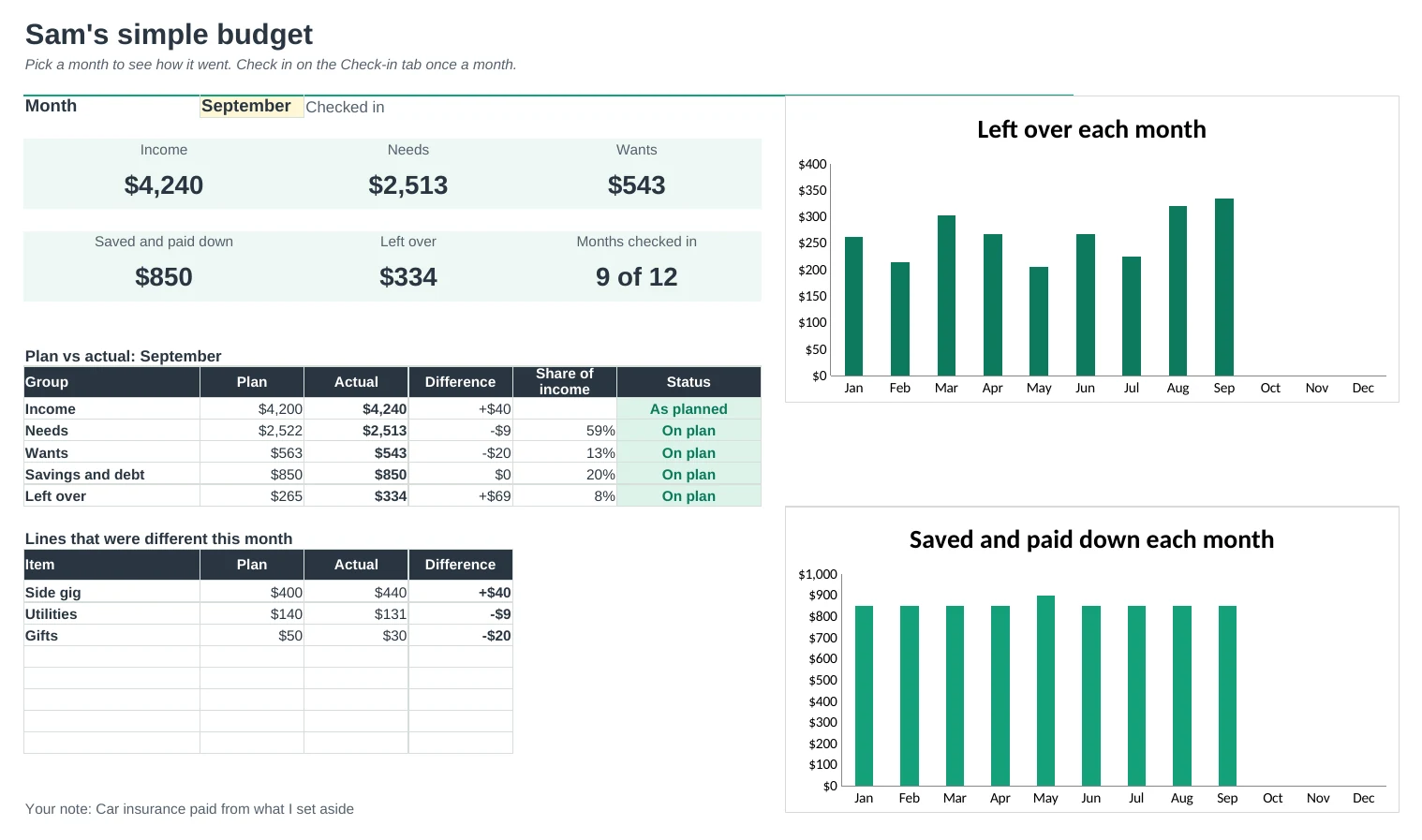
Once a month, type only the lines that were different from the plan. Blank means it went as planned. You'll see if the month was on plan, better or over.
Watch your savings grow
Name a goal like an emergency fund or a vacation. The sheet adds up what you've saved and tells you when you'll reach it.
Print it for the fridge
A one-page printable of your plan with space to write what really happened and tick each line.
| Free | Pro |
|---|---|
| Monthly amounts only | Weekly, yearly or any amount turned monthly |
| 50/30/20 check | 50/30/20, your own targets or zero-based |
| · | Gentle monthly check-in |
| · | Dashboard with plan vs actual |
| · | Savings goals with a reach-by date |
| · | Printable one-page plan |
$19 one-time
6 tabs: Start Here, Dashboard, Plan, Check-in, Printable and Setup. You get two copies: one filled in with a sample budget so you can see it working, and a blank one with starter items.
Get Simple Budget Pro for $19- Instant download after checkout
- Works in Google Sheets and Excel
- Yours to keep and reuse every year