
Free job search spreadsheet template
Keep every job you apply for in one list, with the company, role, date, salary range and where it stands. The tracker tells you when to follow up, flags applications that have gone quiet, reminds you to send thank-you notes after interviews, and shows which job sites actually get you replies.
Pro Want a daily to-do list, interview prep sheets and an offer comparison? See Job Search Pro →| Company | Role | Location | Source | Applied | Salary range | Status | Last contact | Follow up on | Next action | Days since applied | Interviews | Contact | Notes |
|---|---|---|---|---|---|---|---|---|---|---|---|---|---|
| Brightline Health | Marketing Coordinator | Denver, CO | Sep 22, 2026 | $55k-$62k | Rejected | Oct 14, 2026 | Closed | 43 | 1 | Dana Reyes | Went with an internal hire | ||
| Northwind Logistics | Marketing Specialist | Remote | Indeed | Sep 24, 2026 | $60k-$68k | No response | Sep 24, 2026 | Closed | 41 | 0 | |||
| Harbor Credit Union | Communications Coordinator | Denver, CO | Company site | Sep 29, 2026 | $52k-$58k | Interview | Oct 30, 2026 | Nov 6, 2026 | Waiting | 36 | 2 | Mark Ellis | Second round Nov 6 |
| Lumen Software | Content Marketing Associate | Remote | Oct 1, 2026 | $65k-$75k | Offer | Nov 2, 2026 | Decide on offer | 34 | 2 | Priya Shah | Offer $70k, answer by Nov 9 | ||
| Summit Outdoor Gear | Social Media Coordinator | Boulder, CO | Referral | Oct 3, 2026 | $50k-$56k | Phone screen | Oct 27, 2026 | Nov 3, 2026 | Follow up now | 32 | 1 | Chris Patel | Chris referred me |
| Pine Street Coffee Co. | Brand Marketing Assistant | Denver, CO | Indeed | Oct 5, 2026 | $45k-$50k | Applied | Oct 5, 2026 | Oct 12, 2026 | Gone quiet | 30 | 0 | ||
| Cedar & Stone Realty | Marketing Coordinator | Littleton, CO | Indeed | Oct 8, 2026 | $48k-$54k | Withdrawn | Oct 20, 2026 | Closed | 27 | 0 | Commute too long | ||
| Bluebird Learning | Email Marketing Specialist | Remote | Oct 13, 2026 | $58k-$66k | Interview | Oct 29, 2026 | Nov 5, 2026 | Waiting | 22 | 1 | Amy Chen | Panel interview Nov 5 | |
| Redwood Dental Group | Marketing Coordinator | Aurora, CO | Company site | Oct 15, 2026 | $50k-$55k | Applied | Oct 15, 2026 | Oct 22, 2026 | Follow up now | 20 | 0 | ||
| Kestrel Analytics | Marketing Operations Associate | Remote | Recruiter | Oct 19, 2026 | $62k-$70k | Phone screen | Oct 28, 2026 | Nov 4, 2026 | Follow up now | 16 | 1 | Jordan Lee | Recruiter call went well |
| Fieldhouse Sports | Digital Marketing Coordinator | Denver, CO | Oct 21, 2026 | $52k-$60k | Rejected | Oct 31, 2026 | Closed | 14 | 0 | Form rejection email | |||
| Copperline Media | Junior Content Strategist | Remote | Indeed | Oct 26, 2026 | $55k-$62k | Applied | Oct 26, 2026 | Nov 2, 2026 | Follow up now | 9 | 0 | ||
| Atlas Home Services | Marketing Coordinator | Englewood, CO | Company site | Oct 28, 2026 | $50k-$57k | Applied | Oct 28, 2026 | Nov 4, 2026 | Follow up now | 7 | 0 | ||
| Maple Grove Senior Living | Community Relations Coordinator | Lakewood, CO | Referral | Oct 30, 2026 | $48k-$53k | Applied | Oct 30, 2026 | Nov 6, 2026 | Waiting | 5 | 0 | Ruth Gomez | Ruth passed my resume on |
| Riverbend Bank | Marketing Specialist | Denver, CO | Nov 2, 2026 | $60k-$67k | Applied | Nov 2, 2026 | Nov 9, 2026 | Waiting | 2 | 0 | |||
| Oakline Studio | Marketing and Events Assistant | Denver, CO | Indeed | Nov 3, 2026 | $44k-$49k | Applied | Nov 3, 2026 | Nov 10, 2026 | Waiting | 1 | 0 | ||
| Date | Time | Company | Role | Round | Interviewer | Prep done | Thank-you sent | Next step | Notes |
|---|---|---|---|---|---|---|---|---|---|
| Oct 14, 2026 | 10:00 AM | Brightline Health | Marketing Coordinator | Phone screen | Dana Reyes | Done | |||
| Oct 22, 2026 | 1:30 PM | Harbor Credit Union | Communications Coordinator | Video | Mark Ellis | Done | Asked about crisis comms | ||
| Oct 23, 2026 | 11:00 AM | Lumen Software | Content Marketing Associate | Phone screen | Priya Shah | Done | |||
| Oct 27, 2026 | 3:00 PM | Summit Outdoor Gear | Social Media Coordinator | Phone screen | Chris Patel | Send thank-you | Send thank-you to Chris | ||
| Oct 28, 2026 | 9:30 AM | Kestrel Analytics | Marketing Operations Associate | Phone screen | Jordan Lee | Done | |||
| Oct 29, 2026 | 2:00 PM | Lumen Software | Content Marketing Associate | Final | Sam Ortiz | Done | Portfolio review | ||
| Nov 5, 2026 | 10:00 AM | Bluebird Learning | Email Marketing Specialist | Panel | Amy Chen | Prep needed | Bring campaign examples | ||
| Nov 6, 2026 | 1:00 PM | Harbor Credit Union | Communications Coordinator | Onsite | Mark Ellis | Ready | Ask about the team size | ||
| Name | Company | Title | How you know them | Last contact | Check in by | Due? | Notes | |
|---|---|---|---|---|---|---|---|---|
| Chris Patel | Summit Outdoor Gear | Brand Manager | College friend | chris.patel@email.com | Oct 27, 2026 | Nov 10, 2026 | Not yet | Thank him for the referral |
| Ruth Gomez | Maple Grove Senior Living | HR Generalist | Neighbor | ruth.gomez@email.com | Oct 30, 2026 | Nov 13, 2026 | Not yet | Ask if she heard anything |
| Jordan Lee | Kestrel Analytics | Recruiter | Reached out on LinkedIn | jordan.lee@email.com | Oct 28, 2026 | Nov 11, 2026 | Not yet | |
| Megan Brooks | Copperline Media | Content Director | Marketing meetup | megan.brooks@email.com | Oct 12, 2026 | Oct 26, 2026 | Reach out | Coffee chat follow-up |
| Tom Nguyen | Riverbend Bank | Marketing Manager | Former coworker | tom.nguyen@email.com | Oct 5, 2026 | Oct 19, 2026 | Reach out | Ask about the open role |
| Alicia Park | Freelance | Career coach | Library workshop | alicia.park@email.com | Oct 20, 2026 | Nov 3, 2026 | Reach out | Resume review in November |
| Source | Applied | Got a reply | Got interview | Offers | Interview rate |
|---|---|---|---|---|---|
| 5 | 4 | 3 | 1 | 60% | |
| Indeed | 5 | 0 | 0 | 0 | 0% |
| Company site | 3 | 1 | 1 | 0 | 33.3% |
| Referral | 2 | 1 | 1 | 0 | 50% |
| Recruiter | 1 | 1 | 1 | 0 | 100% |
| Other | 0 | 0 | 0 | 0 | |
| Total | 16 | 7 | 6 | 1 | 37.5% |
| Item | Value |
|---|---|
| Today | Nov 4, 2026 |
| Follow up after (days) | 7 |
| Call it gone quiet after (days) | 30 |
| Check in with contacts every (days) | 14 |
| Weekly application goal | 5 |
| Applications sent | 16 |
| Sent in the last 7 days | 3 |
| Weekly goal met? | Not yet: 2 to go |
| Still active | 11 |
| Offers | 1 |
| Rejected | 2 |
| No response | 1 |
| Reply rate | 43.8% |
| Interview rate | 37.5% |
| Follow-ups due now | 5 |
| Gone quiet (mark as No response?) | 1 |
| Upcoming interviews | 2 |
| Thank-you notes to send | 1 |
| Contacts to reach out to | 3 |
What's inside
- One row per application: company, role, location, source, date applied, salary range, status and notes
- A follow-up date for every active application, and a Next action that says Follow up now, Waiting or Gone quiet
- An interview log that flags prep still to do and thank-you notes not yet sent
- A contacts list for networking, with a check-in date so people don't go cold
- Reply and interview rates by job site, so you can spend time where it works
- A weekly application goal and a summary of everything that needs you today
How to use it
Download your copy
Click "Free download" to save the .xlsx file. It opens in Excel, or in Google Sheets: open a blank sheet (sheets.new) and choose File, then Import, then Upload.
Set your rules
On the Summary tab, type =TODAY() in the Today cell. Then set how many days to wait before following up, when to call an application gone quiet, and your weekly goal.
Log each application
Add a row on the Applications tab every time you apply. Use one of these statuses: Applied, Phone screen, Interview, Offer, Rejected, No response or Withdrawn.
Update Last contact
Whenever you hear back or send a follow-up, change the status if needed and put the date in Last contact. The follow-up date moves forward from there.
Add interviews
Put each interview on the Interviews tab with the same company name. Tick Prep done before it and Thank-you sent after. The Interviews count on Applications fills in.
Check the summary each morning
The Summary tab shows follow-ups due, thank-yous to send and contacts to reach out to. Work through those first, then apply for new jobs.
Tips
Follow up once, politely
A short email a week after applying is normal. If there's still nothing after a second try, mark it No response and move on.
Save the job posting
Postings get taken down. Paste the job description into a Google Doc, or add a column for the posting link, so you have it before the interview.
Use the same source names
By Source counts exact words, like LinkedIn or Referral. Keep to the list on that tab, or rename the rows to the sites you use.
Keep salary notes honest
Put the posted range, or your target if none is listed. It helps when you compare offers and when a recruiter asks what you're looking for.
Questions
What should I track in a job search spreadsheet?
At least the company, role, date applied, status and when to follow up. This tracker also keeps the salary range, source, contact person, interview dates and notes.
How does the follow-up date work?
It adds your follow-up days (7 in the sample) to the last contact date, or to the applied date if there's no contact yet. When that day comes, Next action changes to Follow up now.
What does "Gone quiet" mean?
The application is still marked Applied and it's been longer than your quiet limit (30 days in the sample). Change the status to No response to close it out.
Can I use it as a job application tracker on my phone?
Yes. Open your copy in the Google Sheets app to add applications and update statuses on the go.
Can I print it?
Yes. Go to File > Print, choose Landscape and "Fit to width". For a short printout, hide the Notes column first or print only the selected cells.
Is this job search tracker free?
Yes. Download the .xlsx file and open it in Excel or Google Sheets. No sign-up needed.
Pro version
Job Search Pro
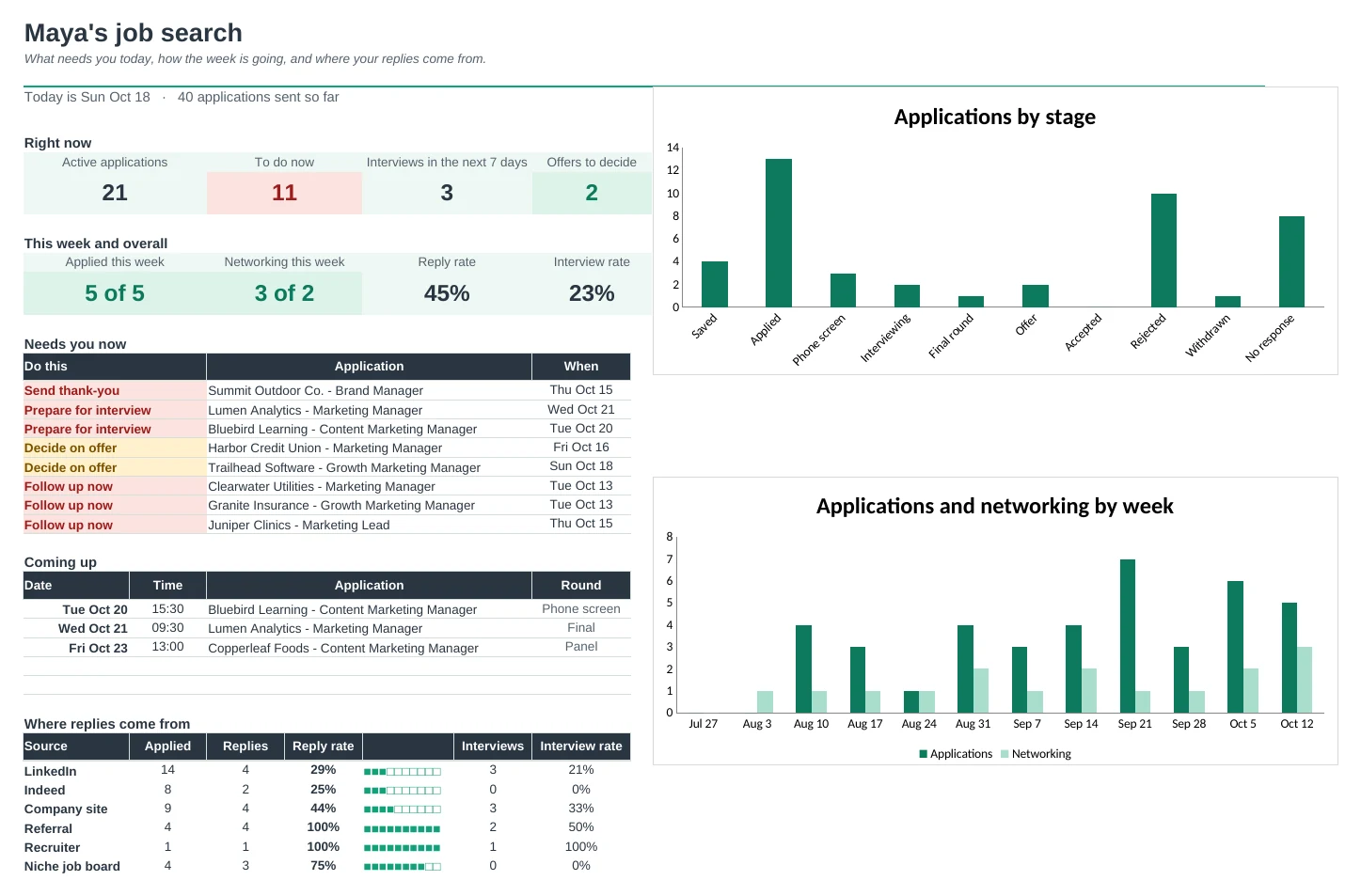
Every application, interview and contact in one place, with a daily to-do list, a one-page prep sheet and a side-by-side offer comparison.
Know what to do today
Each job gets a next action: follow up, prepare for an interview, send a thank-you or decide on an offer. The Dashboard lists them in order, so nothing slips.
Follow-ups on time
Follow-up dates count from the last time you heard from them, with a different wait for each stage. Applications with no reply for three weeks are marked Gone quiet.
Walk in prepared
Keep notes for each interview: what they do, what they want, your stories and your questions. Prep Sheet prints them on one page with the interview schedule and the people you know there.
Keep your network warm
Log coffee chats, messages and events. Each contact shows when you last talked and when to check in again, and promised follow-ups get flagged.
Compare offers properly
Put up to four offers side by side: base, bonus, equity, retirement match, health costs, perks and commute. See the real yearly total and pay per hour, then a weighted score on what matters to you.
See what's working
Reply and interview rates by job source, and a weekly activity view against your goals for applications and networking.
| Free | Pro |
|---|---|
| Applications list with a follow-up date | Applications with a next action for every job |
| One follow-up wait for all | Follow-up wait set per stage, plus Gone quiet flags |
| Interview log | Interview log with prep and thank-you flags |
| Contacts list | Contacts with a networking log and check-in dates |
| · | Prep notes and a printable one-page prep sheet |
| · | Offer comparison with total pay and weighted scores |
| Reply rate by source | Reply and interview rates by source |
| Weekly application goal | Weekly goals for applications and networking, with charts |
$19 one-time
11 tabs: Start Here, Dashboard, Applications, Interviews, Contacts, Networking, Prep Notes, Prep Sheet, Offers, Weekly and Setup. You get two copies: one filled in with a sample job search so you can see it working, and a blank one ready for your own.
Get Job Search Pro for $19- Instant download after checkout
- Works in Google Sheets and Excel
- Yours to keep and reuse every year