
Free paycheck spreadsheet template
Copy the numbers from each pay stub into one row and the sheet works out your gross pay, total deductions, net pay and year-to-date totals. It also checks your math against the stub, so a short paycheck stands out instead of slipping by.
Pro Want every stub checked, a pay calendar and a heads-up if your next check looks wrong? See Paycheck Pro →| Pay date | Regular hours | Overtime hours | Hourly rate | Other pay | Gross pay | Federal tax | State tax | Social Security | Medicare | Health insurance | 401(k) | Other deductions | Total deductions | Net pay | Net on pay stub | Check | Gross so far | Net so far | Take-home share |
|---|---|---|---|---|---|---|---|---|---|---|---|---|---|---|---|---|---|---|---|
| Jan 2, 2026 | 80 | 0 | $27.50 | $0.00 | $2,200.00 | $183.77 | $84.90 | $130.68 | $30.56 | $92.30 | $110.00 | $0.00 | $632.21 | $1,567.79 | $1,567.79 | Matches | $2,200.00 | $1,567.79 | 71.3% |
| Jan 16, 2026 | 80 | 4 | $27.50 | $0.00 | $2,365.00 | $199.14 | $91.56 | $140.91 | $32.95 | $92.30 | $118.25 | $0.00 | $675.11 | $1,689.89 | $1,689.89 | Matches | $4,565.00 | $3,257.68 | 71.5% |
| Jan 30, 2026 | 80 | 0 | $27.50 | $0.00 | $2,200.00 | $183.77 | $84.90 | $130.68 | $30.56 | $92.30 | $110.00 | $0.00 | $632.21 | $1,567.79 | $1,567.79 | Matches | $6,765.00 | $4,825.47 | 71.3% |
| Feb 13, 2026 | 80 | 0 | $27.50 | $0.00 | $2,200.00 | $183.77 | $84.90 | $130.68 | $30.56 | $92.30 | $110.00 | $0.00 | $632.21 | $1,567.79 | $1,567.79 | Matches | $8,965.00 | $6,393.26 | 71.3% |
| Feb 27, 2026 | 80 | 6 | $27.50 | $0.00 | $2,447.50 | $206.82 | $94.89 | $146.02 | $34.15 | $92.30 | $122.38 | $0.00 | $696.56 | $1,750.94 | $1,750.94 | Matches | $11,412.50 | $8,144.20 | 71.5% |
| Mar 13, 2026 | 80 | 0 | $27.50 | $500.00 | $2,700.00 | $230.32 | $105.09 | $161.68 | $37.81 | $92.30 | $135.00 | $0.00 | $762.20 | $1,937.80 | $1,937.80 | Matches | $14,112.50 | $10,082.00 | 71.8% |
| Mar 27, 2026 | 80 | 0 | $27.50 | $0.00 | $2,200.00 | $183.77 | $84.90 | $130.68 | $30.56 | $92.30 | $110.00 | $0.00 | $632.21 | $1,567.79 | $1,567.79 | Matches | $16,312.50 | $11,649.79 | 71.3% |
| Apr 10, 2026 | 80 | 0 | $27.50 | $0.00 | $2,200.00 | $183.77 | $84.90 | $130.68 | $30.56 | $92.30 | $110.00 | $0.00 | $632.21 | $1,567.79 | $1,567.79 | Matches | $18,512.50 | $13,217.58 | 71.3% |
| Apr 24, 2026 | 80 | 0 | $27.50 | $0.00 | $2,200.00 | $183.77 | $84.90 | $130.68 | $30.56 | $92.30 | $110.00 | $0.00 | $632.21 | $1,567.79 | $1,567.79 | Matches | $20,712.50 | $14,785.37 | 71.3% |
| May 8, 2026 | 80 | 8 | $27.50 | $0.00 | $2,530.00 | $214.50 | $98.23 | $151.14 | $35.35 | $92.30 | $126.50 | $0.00 | $718.02 | $1,811.98 | $1,811.98 | Matches | $23,242.50 | $16,597.35 | 71.6% |
| May 22, 2026 | 80 | 5 | $27.50 | $0.00 | $2,406.25 | $202.98 | $93.23 | $143.46 | $33.55 | $92.30 | $120.31 | $0.00 | $685.83 | $1,720.42 | $1,720.42 | Matches | $25,648.75 | $18,317.77 | 71.5% |
| Jun 5, 2026 | 80 | 0 | $27.50 | $0.00 | $2,200.00 | $183.77 | $84.90 | $130.68 | $30.56 | $92.30 | $110.00 | $0.00 | $632.21 | $1,567.79 | $1,567.79 | Matches | $27,848.75 | $19,885.56 | 71.3% |
| Jun 19, 2026 | 80 | 0 | $27.50 | $0.00 | $2,200.00 | $183.77 | $84.90 | $130.68 | $30.56 | $92.30 | $110.00 | $0.00 | $632.21 | $1,567.79 | $1,567.79 | Matches | $30,048.75 | $21,453.35 | 71.3% |
| Jul 3, 2026 | 80 | 0 | $28.75 | $0.00 | $2,300.00 | $193.08 | $88.94 | $136.88 | $32.01 | $92.30 | $115.00 | $0.00 | $658.21 | $1,641.79 | $1,641.79 | Matches | $32,348.75 | $23,095.14 | 71.4% |
| Jul 17, 2026 | 80 | 0 | $28.75 | $0.00 | $2,300.00 | $193.08 | $88.94 | $136.88 | $32.01 | $92.30 | $115.00 | $0.00 | $658.21 | $1,641.79 | $1,641.79 | Matches | $34,648.75 | $24,736.93 | 71.4% |
| Jul 31, 2026 | 80 | 3 | $28.75 | $0.00 | $2,429.38 | $205.13 | $94.16 | $144.90 | $33.89 | $92.30 | $121.47 | $0.00 | $691.85 | $1,737.53 | $1,737.53 | Matches | $37,078.13 | $26,474.46 | 71.5% |
| Aug 14, 2026 | 80 | 0 | $28.75 | $0.00 | $2,300.00 | $193.08 | $88.94 | $136.88 | $32.01 | $92.30 | $115.00 | $0.00 | $658.21 | $1,641.79 | $1,616.79 | Off by $25.00 | $39,378.13 | $28,116.25 | 71.4% |
| Aug 28, 2026 | 80 | 0 | $28.75 | $0.00 | $2,300.00 | $193.08 | $88.94 | $136.88 | $32.01 | $92.30 | $115.00 | $0.00 | $658.21 | $1,641.79 | $1,641.79 | Matches | $41,678.13 | $29,758.04 | 71.4% |
| Sep 11, 2026 | 80 | 0 | $28.75 | $0.00 | $2,300.00 | $193.08 | $88.94 | $136.88 | $32.01 | $92.30 | $115.00 | $0.00 | $658.21 | $1,641.79 | $1,641.79 | Matches | $43,978.13 | $31,399.83 | 71.4% |
| Sep 25, 2026 | 80 | 6 | $28.75 | $0.00 | $2,558.75 | $217.17 | $99.39 | $152.92 | $35.76 | $92.30 | $127.94 | $0.00 | $725.48 | $1,833.27 | $1,833.27 | Matches | $46,536.88 | $33,233.10 | 71.6% |
| Oct 9, 2026 | 80 | 0 | $28.75 | $0.00 | $2,300.00 | $193.08 | $88.94 | $136.88 | $32.01 | $92.30 | $115.00 | $0.00 | $658.21 | $1,641.79 | $1,641.79 | Matches | $48,836.88 | $34,874.89 | 71.4% |
| Item | Year to date | Per paycheck | Share of gross |
|---|---|---|---|
| Paychecks this year | 21 | ||
| Regular hours | 1,680 | 80 | |
| Overtime hours | 32 | 1.52 | |
| Other pay | $500.00 | $23.81 | 1% |
| Gross pay | $48,836.88 | $2,325.57 | 100% |
| Federal tax | $4,104.70 | $195.46 | 8.4% |
| State tax | $1,889.39 | $89.97 | 3.9% |
| Social Security | $2,907.75 | $138.46 | 6% |
| Medicare | $680.00 | $32.38 | 1.4% |
| Health insurance | $1,938.30 | $92.30 | 4% |
| 401(k) | $2,441.85 | $116.28 | 5% |
| Other deductions | $0.00 | $0.00 | 0% |
| Total deductions | $13,961.99 | $664.86 | 28.6% |
| Net pay | $34,874.89 | $1,660.71 | 71.4% |
| Taxes withheld (federal, state, FICA) | $9,581.84 | $456.28 | 19.6% |
| Paychecks that don't match the stub | 1 |
| Month | Paychecks | Gross pay | Taxes | Benefits and other | Net pay | Note |
|---|---|---|---|---|---|---|
| January 2026 | 3 | $6,765.00 | $1,324.38 | $615.15 | $4,825.47 | 3 paychecks |
| February 2026 | 2 | $4,647.50 | $911.79 | $416.98 | $3,318.73 | |
| March 2026 | 2 | $4,900.00 | $964.81 | $429.60 | $3,505.59 | |
| April 2026 | 2 | $4,400.00 | $859.82 | $404.60 | $3,135.58 | |
| May 2026 | 2 | $4,936.25 | $972.44 | $431.41 | $3,532.40 | |
| June 2026 | 2 | $4,400.00 | $859.82 | $404.60 | $3,135.58 | |
| July 2026 | 3 | $7,029.38 | $1,379.90 | $628.37 | $5,021.11 | 3 paychecks |
| August 2026 | 2 | $4,600.00 | $901.82 | $414.60 | $3,283.58 | |
| September 2026 | 2 | $4,858.75 | $956.15 | $427.54 | $3,475.06 | |
| October 2026 | 1 | $2,300.00 | $450.91 | $207.30 | $1,641.79 | |
| November 2026 | 0 | $0.00 | $0.00 | $0.00 | $0.00 | |
| December 2026 | 0 | $0.00 | $0.00 | $0.00 | $0.00 | |
| Total | 21 | $48,836.88 | $9,581.84 | $4,380.15 | $34,874.89 |
What's inside
- One row per paycheck with hours, rate, overtime at time and a half, and other pay like bonuses or tips
- Columns for federal and state tax, Social Security, Medicare, health insurance, 401(k) and other deductions
- Net pay worked out for you, then checked against the net amount on your pay stub
- Gross and net so far this year on every row, and the share of your gross you actually take home
- A year-to-date tab with totals and averages per paycheck, and a month view that flags three-paycheck months
- Works in Google Sheets and Excel
How to use it
Download your copy
Click "Free download" to save the .xlsx file. It opens in Excel, or in Google Sheets: open a blank sheet (sheets.new) and choose File, then Import, then Upload. Your pay details stay in your own file.
Replace the samples
Type over the sample paychecks with your own, starting at the top, and delete any extra rows. For each new paycheck, copy the row above down so the formula columns come with it: Gross pay, Total deductions, Net pay, Check and the last three.
Enter each pay stub
Type the pay date, your hours and rate, then copy each tax and deduction from the stub. If you're on salary, type your gross pay straight into the Gross pay column instead.
Type the net from your stub
Put the net amount printed on your stub in Net on pay stub. The Check column says Matches, or how much it's off by.
Review the totals
The Year to Date tab adds everything up. Compare it with the year-to-date column on your latest stub, and with your W-2 at the end of the year.
Tips
When a check says Off by
Look for a deduction you didn't enter, like a uniform or union fee, or hours that don't match your timesheet. If you can't find it, ask your payroll department.
Spot three-paycheck months
If you're paid every two weeks, two months a year bring a third paycheck. The By Month tab flags them, which is handy for planning an extra savings deposit.
Use it to check a raise
After a raise, compare a new paycheck with an old one. The Take-home share column shows how much of the raise you really keep after taxes and deductions.
Ask before changing withholding
This sheet only records what was withheld. It doesn't work out what your taxes should be. For W-4 or withholding questions, check with a tax professional or the IRS withholding estimator.
Questions
What's the difference between gross pay and net pay?
Gross pay is what you earned before anything comes out. Net pay, or take-home pay, is what's left after taxes and deductions like health insurance and 401(k). It's the amount that lands in your bank account.
Does this template calculate my taxes?
No. Tax withholding depends on your W-4, your state and your benefits, so the sheet lets you copy the real amounts from your pay stub. It then adds them up and checks the math.
Can I use it if I'm on salary?
Yes. Leave the hours and rate blank and type your gross pay straight over the Gross pay formula. Everything else works the same.
What are Social Security and Medicare on my stub?
They're federal payroll taxes, often shown together as FICA. They're taken from almost every paycheck and listed as their own lines, so the sheet has a column for each.
Can I track two jobs?
Yes. Make one copy of the sheet per job, or add a Job column and use a filter. The Year to Date tab adds up every row on the Paychecks tab.
Is it free?
Yes. Download the .xlsx file and open it in Excel or Google Sheets. No sign-up needed.
Pro version
Paycheck Pro
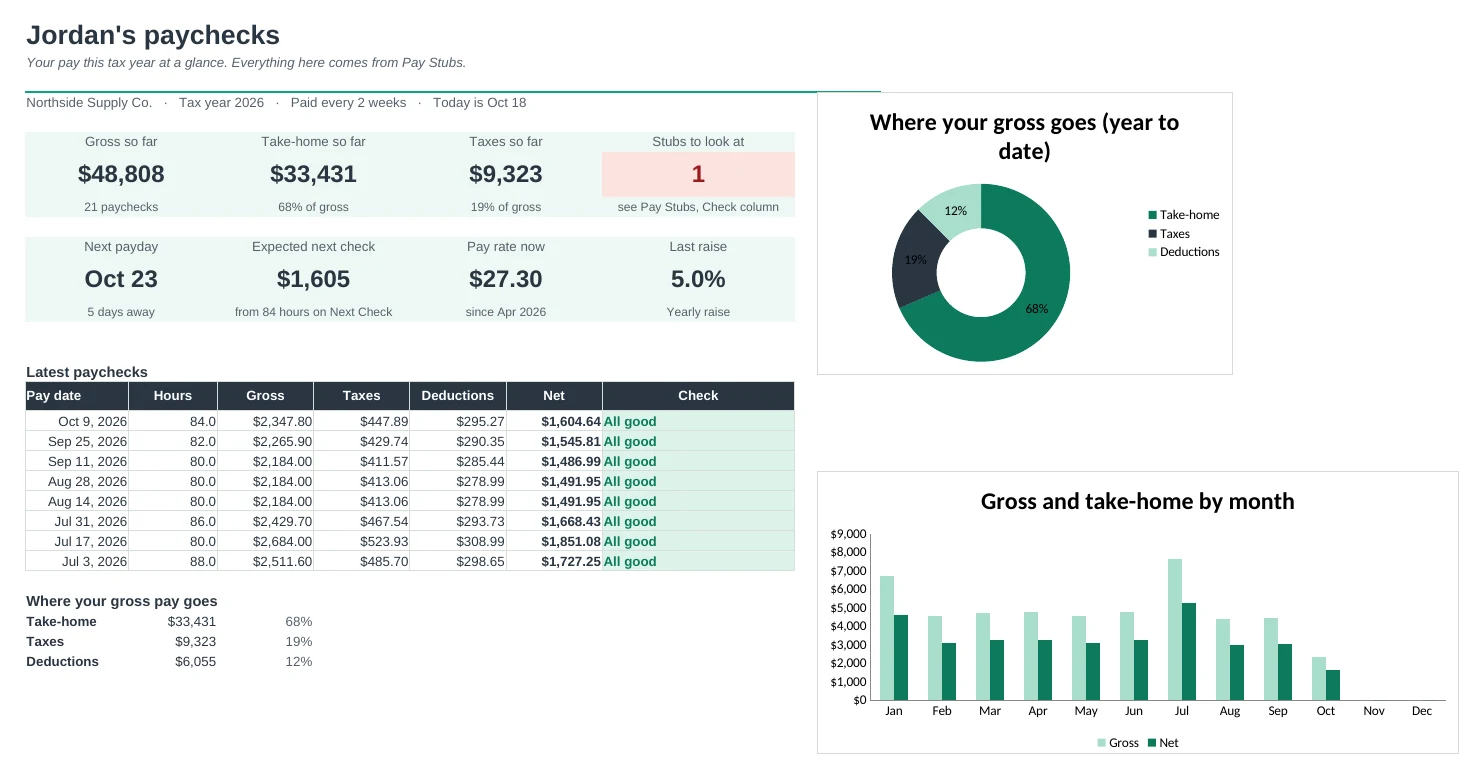
Log every pay stub in one row and the sheet checks your hours, your rate and the math, so a short paycheck gets caught.
Every stub checked for you
Gross is checked against your hours and rate, net against the stub's own math, and year-to-date against your running total. One Check column says All good or exactly what's off and by how much.
Know before payday
Type the hours you worked and Next Check estimates your net pay from your last stub. When the money lands, type it in and it tells you if it looks right.
Your deductions, your names
Name up to 8 deductions just as your stub does: health insurance, 401(k), HSA, union dues. The columns, totals and estimates follow.
Every payday on a calendar
Weekly, every 2 weeks, twice a month or monthly: all your paydays for the year, which are paid, which is next, and the months with an extra paycheck.
Raise history that does the work
Log each raise once. Every paycheck is checked against the rate in effect for its pay period, and you can see how your pay has grown.
Year-to-date ready for tax time
Every line added up with per-check averages and shares of gross, a month-by-month table, and a check against your last stub's year-to-date. Handy when your W-2 arrives. It isn't tax advice.
| Free | Pro |
|---|---|
| One row per paycheck | One row per stub, with deductions named your way |
| Net checked against the stub | Gross, net, year-to-date and FICA shares all checked |
| Year-to-date totals | Year-to-date by line, by month and against your last stub |
| Month view | Month view plus extra-paycheck months |
| · | Next-check estimate and a 'does it look right?' check |
| · | Pay calendar with next payday |
| · | Raise history with the rate each check should use |
| · | Dashboard with charts |
$19 one-time
8 tabs: Start Here, Dashboard, Pay Stubs, Next Check, Year to Date, Pay Calendar, Raises and Setup. You get two copies: one filled in with a sample year of paychecks so you can see it working, and a blank one ready for your own stubs.
Get Paycheck Pro for $19- Instant download after checkout
- Works in Google Sheets and Excel
- Yours to keep and reuse every year