
Free travel itinerary template for Google Sheets
Put the whole trip in one place: what you're doing each day, where to be and when, every confirmation number, and what it all costs. The budget adds itself up from your plans and bookings, and the packing list tells you how much is left to pack.
| Date | Day | Time | Plan | Where | Category | Confirmation # | Cost | Paid | Notes |
|---|---|---|---|---|---|---|---|---|---|
| Mar 11, 2027 | Thu | 7:10 AM | Leave for airport | Home | Getting around | Park in Lot C, $18 a day | |||
| Mar 11, 2027 | Thu | 9:05 AM | Flight DEN to SAN | Denver International Airport | Flights | KX7Q2M | Southwest 1442, arrives 10:40 AM | ||
| Mar 11, 2027 | Thu | 11:15 AM | Pick up rental car | San Diego Airport rental center | Car rental | R-55821904 | |||
| Mar 11, 2027 | Thu | 3:00 PM | Check in to hotel | Hotel La Playa, Pacific Beach | Lodging | HLP-302118 | Ask for an ocean view room | ||
| Mar 11, 2027 | Thu | 6:30 PM | Dinner at Oscar's Mexican Seafood | 703 Turquoise St, San Diego | Food | $48.00 | Cash or card, line moves fast | ||
| Mar 12, 2027 | Fri | 9:00 AM | San Diego Zoo | 2920 Zoo Dr, San Diego | Activities | ZOO-88123 | $148.00 | Two 1-day passes, bring sunscreen | |
| Mar 12, 2027 | Fri | 1:00 PM | Lunch in Balboa Park | Balboa Park | Food | $35.00 | |||
| Mar 12, 2027 | Fri | 7:00 PM | Dinner in Little Italy | India St, San Diego | Food | $90.00 | Saturday farmers market is here too | ||
| Mar 13, 2027 | Sat | 8:30 AM | Breakfast | Hotel La Playa | Food | $0.00 | Included with room | ||
| Mar 13, 2027 | Sat | 10:00 AM | La Jolla kayak tour | 2199 Avenida de la Playa, La Jolla | Activities | LJK-4471 | Check in 15 min early | ||
| Mar 13, 2027 | Sat | 5:30 PM | Sunset Cliffs walk | Sunset Cliffs Natural Park | Activities | $0.00 | Sunset about 7:05 PM | ||
| Mar 13, 2027 | Sat | 7:30 PM | Dinner at the beach | Pacific Beach | Food | $75.00 | |||
| Mar 14, 2027 | Sun | 10:00 AM | Check out of hotel | Hotel La Playa | Lodging | Checkout by 11 AM | |||
| Mar 14, 2027 | Sun | 11:00 AM | Old Town San Diego | Old Town State Historic Park | Activities | $25.00 | Free to walk around | ||
| Mar 14, 2027 | Sun | 2:30 PM | Return rental car, fill tank first | San Diego Airport rental center | Getting around | $60.00 | Gas | ||
| Mar 14, 2027 | Sun | 4:45 PM | Flight SAN to DEN | San Diego International Airport | Flights | KX7Q2M | Southwest 2219, lands 8:05 PM |
| Category | Company | Details | Start date | Start time | End date | End time | Confirmation # | Cost | Paid | Nights |
|---|---|---|---|---|---|---|---|---|---|---|
| Flights | Southwest | Round trip for 2, return flight departs 4:45 PM | Mar 11, 2027 | 9:05 AM | Mar 14, 2027 | 4:45 PM | KX7Q2M | $486.00 | ||
| Lodging | Hotel La Playa | King room, ocean view | Mar 11, 2027 | 3:00 PM | Mar 14, 2027 | 11:00 AM | HLP-302118 | $789.00 | 3 | |
| Car rental | Enterprise | Midsize SUV, airport pickup | Mar 11, 2027 | 11:15 AM | Mar 14, 2027 | 2:30 PM | R-55821904 | $214.00 | ||
| Activities | La Jolla Kayak | Sea cave tour, 2 people | Mar 13, 2027 | 10:00 AM | Mar 13, 2027 | 12:00 PM | LJK-4471 | $130.00 | ||
| Getting around | Denver Airport Parking | Economy lot, 4 days | Mar 11, 2027 | 7:30 AM | Mar 14, 2027 | 8:30 PM | $72.00 |
| Category | Planned | Booked or spent | Left |
|---|---|---|---|
| Flights | $500.00 | $486.00 | $14.00 |
| Lodging | $800.00 | $789.00 | $11.00 |
| Car rental | $250.00 | $214.00 | $36.00 |
| Activities | $350.00 | $303.00 | $47.00 |
| Food | $400.00 | $248.00 | $152.00 |
| Getting around | $150.00 | $132.00 | $18.00 |
| Other | $100.00 | $0.00 | $100.00 |
| Total | $2,550.00 | $2,172.00 | $378.00 |
| Item | Category | Whose | Packed |
|---|---|---|---|
| Driver's licenses | Documents | Both | |
| Boarding passes on phone | Documents | Both | |
| Credit card and some cash | Documents | Both | |
| Phone chargers | Electronics | Both | |
| Portable battery | Electronics | Jess | |
| Swimsuits | Clothes | Both | |
| Light jacket for evenings | Clothes | Both | |
| Walking shoes | Clothes | Both | |
| Sunscreen, travel size | Toiletries | Jess | |
| Toothbrushes and toothpaste | Toiletries | Both | |
| Medications | Toiletries | Mark | |
| Sunglasses and hats | Beach | Both | |
| Reusable water bottles | Beach | Both | |
| Snacks for the plane | Other | Mark |
| Item | Value |
|---|---|
| Trip starts | Mar 11, 2027 |
| Trip ends | Mar 14, 2027 |
| Days | 4 |
| Travelers | 2 |
| Budget | $2,550.00 |
| Booked or spent | $2,172.00 |
| Left in budget | $378.00 |
| Cost per traveler | $1,086.00 |
| Bookings not paid yet | $1,075.00 |
| Items packed | 5 |
| Items left to pack | 9 |
What's inside
- A day-by-day plan with the weekday filled in from each date
- A bookings tab for flights, hotels, rental cars and tours, with confirmation numbers and nights worked out
- A trip budget that adds up costs from your plan and your bookings by category
- A packing list with checkboxes and a count of what's left to pack
- A trip summary with dates, total cost, cost per traveler and anything still unpaid
- Works in Google Sheets and Excel, and on your phone while you travel
How to use it
Make your copy
Click "Make a copy" to save the template to your Google Drive, or download the Excel file. Clear the sample San Diego trip from each tab.
Add your bookings
Enter each flight, hotel, car and tour on the Bookings tab with its confirmation number and price. Tick Paid once it's paid in full.
Plan each day
On the Itinerary tab, add one row per plan: date, time, what, where. Give each row a category from the Budget tab so its cost is counted.
Set your budget
On the Budget tab, type what you want to spend in each category. Booked or spent and Left update as you add plans and bookings.
Pack with the list
Edit the Packing List for your trip and tick items off as they go in the bag. The Trip Summary shows how many are left.
Take it with you
Open the sheet in the Google Sheets app on your phone. To use it without signal, turn on offline access for the file before you leave.
Tips
Put each cost in one place
If a booking is on the Bookings tab with its price, leave the Cost blank when it shows up on the Itinerary. Otherwise the budget counts it twice.
Keep category names the same
The budget matches categories by name. "Food" and "Meals" count as two different things, so stick to the names on the Budget tab, or rename them there first.
Share it with your travel group
Click Share and add everyone on the trip as editors. Each person can add their own bookings and tick off their own packing.
Sort by date and time
Added a plan out of order? Select the Itinerary rows below the header, then Data > Sort range by Date, then by Time.
Questions
How do I make a travel itinerary in Google Sheets?
Make a copy of this template, add your bookings first, then fill in one row per plan on the Itinerary tab with the date, time and place. The weekday, budget and summary fill in for you.
Can I use the itinerary offline?
Yes. In Google Drive, turn on offline access for the file, or download the Excel version to your phone before you go.
How do I add more days?
Just keep adding rows at the bottom of the Itinerary tab. The budget and summary count up to 300 rows, so long trips are fine. Copy the Day formula down to the new rows.
Does it work for a group trip?
Yes. Change Travelers on the Trip Summary tab to see cost per person, and use the Whose column on the packing list to split up shared items.
Can I print my itinerary?
Yes. Go to File > Print, choose landscape and "Fit to width". Printing just the Itinerary and Bookings tabs gives you a paper backup with every confirmation number.
Is it free?
Yes. Copy it to Google Drive or download the Excel file. There's no sign-up.
Pro version
Travel Planner Pro
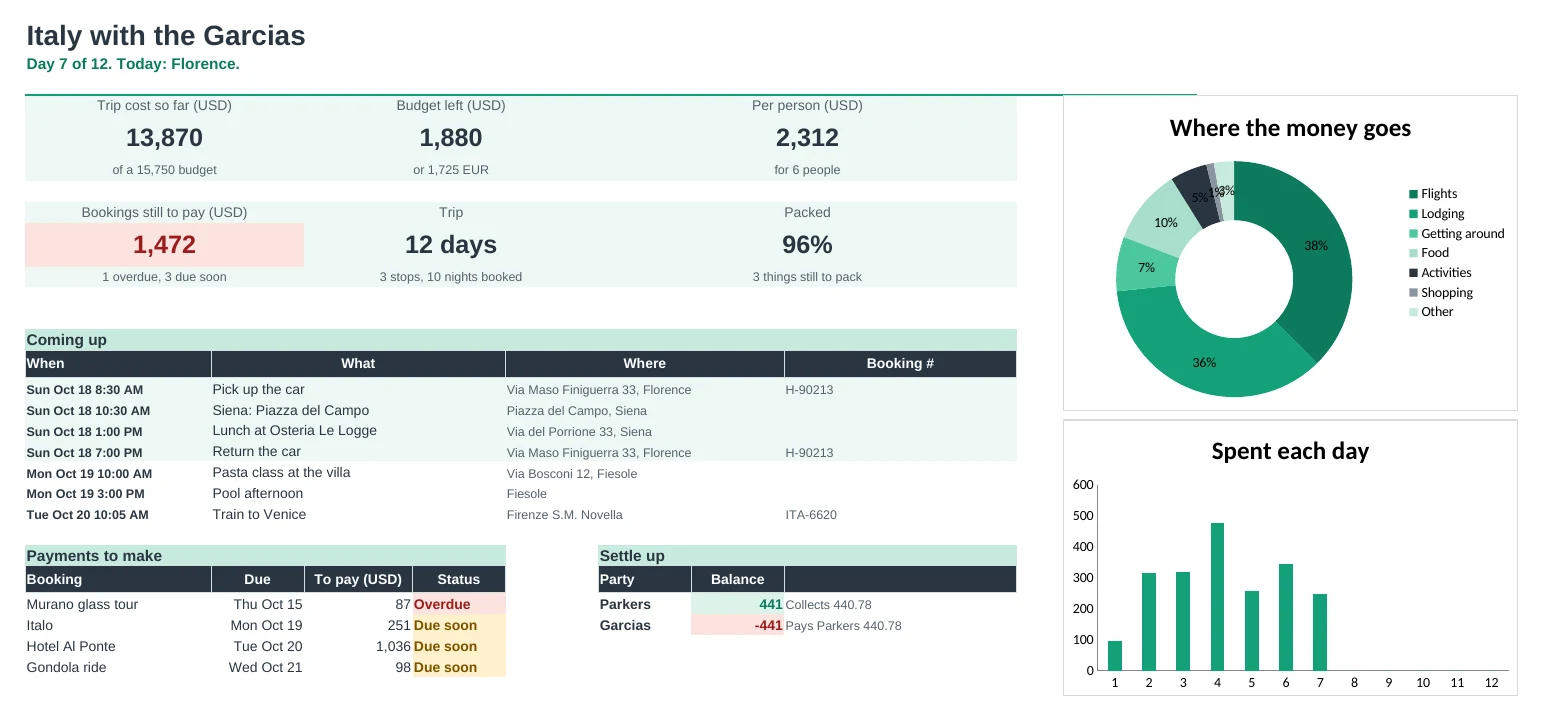
Plan a multi-city trip day by day, track every booking and cost in two currencies, and split it fairly with the people you travel with.
Every day laid out
Add plans in any order. The Days tab shows each day's city, where you're sleeping and what's on, and every plan has a map link.
Two currencies, one rate
Type each cost in whichever currency you paid. Budgets and totals show in your home currency and the trip currency, using the rate you set once.
Bookings in one place
Confirmation numbers, addresses, check-in times, what's paid and when the rest is due. Payments due soon turn amber and overdue ones turn red.
Split costs without the maths
Pick who paid and who shares each cost. Families can count as one party with a bigger share. Split Costs shows exactly who pays whom to settle up.
Stay on budget
Each category shows budget, booked and spent so far, with Over and Close flags, plus cost per person and per day.
Pack for everyone
One packing list with a column per traveller and a shared column, and a percentage that shows who's ready.
| Free | Pro |
|---|---|
| One itinerary list | Itinerary plus a worked-out day-by-day view with city and where you sleep |
| One currency | Two currencies with an exchange rate |
| Bookings list | Bookings with balances, due dates and overdue flags |
| Budget by category | Budget against booked and spent, per person and per day |
| · | Expenses log for spending on the trip |
| · | Cost splitting and settle-up for groups and families |
| Packing list | Packing per traveller with progress |
| · | Dashboard with what's coming up and payments to make |
$19 one-time
10 tabs: Start Here, Dashboard, Itinerary, Days, Bookings, Expenses, Budget, Split Costs, Packing and Setup. You get two copies: one filled in with a sample two-family trip to Italy so you can see it working, and a blank one ready for your own.
Get Travel Planner Pro for $19- Instant download after checkout
- Works in Google Sheets and Excel
- Yours to keep and reuse every year