
Free vehicle maintenance log template
Write down each oil change, tire rotation and repair as it happens. The sheet finds the last time each job was done, works out when it's due again by mileage or by date, and flags anything overdue. It handles more than one vehicle and adds up what each one costs.
| Date | Vehicle | Mileage | Service | Done by | Cost | Notes |
|---|---|---|---|---|---|---|
| May 14, 2022 | F-150 | 60,800 | Transmission fluid change | Ford dealer | $219.00 | |
| Sep 12, 2023 | CR-V | 27,400 | Brake fluid change | Honda dealer | $129.95 | |
| Sep 20, 2025 | F-150 | 101,000 | Engine air filter | DIY | $22.99 | Motorcraft filter |
| Nov 14, 2025 | CR-V | 36,900 | Oil and filter change | Valvoline | $79.99 | 0W-20 synthetic |
| Nov 14, 2025 | CR-V | 36,900 | Tire rotation | Valvoline | $25.00 | |
| Nov 30, 2025 | F-150 | 103,900 | Battery test | AutoZone | $0.00 | Free test, battery fine |
| Jan 17, 2026 | F-150 | 104,800 | Oil and filter change | Main Street Auto | $69.95 | |
| Feb 8, 2026 | CR-V | 39,350 | Wiper blades | DIY | $32.48 | |
| Apr 5, 2026 | F-150 | 107,300 | Front brake pads | Main Street Auto | $289.00 | Rotors still OK |
| Apr 20, 2026 | CR-V | 41,880 | State inspection | Main Street Auto | $35.00 | Passed |
| May 3, 2026 | CR-V | 42,100 | Oil and filter change | Valvoline | $84.99 | |
| Jun 10, 2026 | F-150 | 109,950 | Oil and filter change | Main Street Auto | $72.50 | |
| Jun 10, 2026 | F-150 | 109,950 | Tire rotation | Main Street Auto | $20.00 | |
| Jun 21, 2026 | CR-V | 43,500 | New tires (set of 4) | Discount Tire | $812.40 | Rotation free with the tires |
| Jun 21, 2026 | CR-V | 43,500 | Tire rotation | Discount Tire | $0.00 | |
| Aug 30, 2026 | CR-V | 45,900 | Engine air filter | DIY | $24.99 | |
| Aug 30, 2026 | CR-V | 45,900 | Cabin air filter | DIY | $18.99 | |
| Oct 11, 2026 | CR-V | 47,600 | Oil and filter change | Valvoline | $84.99 | Sticker says next at 52,600 |
| Vehicle | Service | Every (miles) | Every (months) | Last done | Last mileage | Next due (miles) | Next due (date) | Miles left | Days left | Status |
|---|---|---|---|---|---|---|---|---|---|---|
| CR-V | Oil and filter change | 5,000 | 6 | Oct 11, 2026 | 47,600 | 52,600 | Apr 11, 2027 | 4,390 | 158 | OK |
| CR-V | Tire rotation | 7,500 | 12 | Jun 21, 2026 | 43,500 | 51,000 | Jun 21, 2027 | 2,790 | 229 | OK |
| CR-V | Engine air filter | 15,000 | 12 | Aug 30, 2026 | 45,900 | 60,900 | Aug 30, 2027 | 12,690 | 299 | OK |
| CR-V | Cabin air filter | 15,000 | 12 | Aug 30, 2026 | 45,900 | 60,900 | Aug 30, 2027 | 12,690 | 299 | OK |
| CR-V | Brake fluid change | 36 | Sep 12, 2023 | 27,400 | Sep 12, 2026 | -53 | Overdue | |||
| CR-V | Wiper blades | 12 | Feb 8, 2026 | 39,350 | Feb 8, 2027 | 96 | OK | |||
| CR-V | State inspection | 12 | Apr 20, 2026 | 41,880 | Apr 20, 2027 | 167 | OK | |||
| F-150 | Oil and filter change | 5,000 | 6 | Jun 10, 2026 | 109,950 | 114,950 | Dec 10, 2026 | 2,310 | 36 | OK |
| F-150 | Tire rotation | 7,500 | 12 | Jun 10, 2026 | 109,950 | 117,450 | Jun 10, 2027 | 4,810 | 218 | OK |
| F-150 | Engine air filter | 15,000 | 12 | Sep 20, 2025 | 101,000 | 116,000 | Sep 20, 2026 | 3,360 | -45 | Overdue |
| F-150 | Transmission fluid change | 60,000 | May 14, 2022 | 60,800 | 120,800 | 8,160 | OK | |||
| F-150 | Spark plugs | 100,000 | No record yet | |||||||
| F-150 | Battery test | 12 | Nov 30, 2025 | 103,900 | Nov 30, 2026 | 26 | Due soon | |||
| Vehicle | Year | Make | Model | Plate | Current mileage | Mileage as of | Registration due | Spent this year | Spent all time | Services logged |
|---|---|---|---|---|---|---|---|---|---|---|
| CR-V | 2019 | Honda | CR-V EX | 8KXR214 | 48,210 | Nov 1, 2026 | Mar 31, 2027 | $1,093.84 | $1,328.78 | 11 |
| F-150 | 2015 | Ford | F-150 XLT | 4TRK992 | 112,640 | Oct 28, 2026 | Jul 31, 2027 | $451.45 | $693.44 | 7 |
| Item | Value |
|---|---|
| Today's date | Nov 4, 2026 |
| Due soon within (miles) | 1,000 |
| Due soon within (days) | 30 |
| Services overdue | 2 |
| Services due soon | 1 |
| Never logged | 1 |
| Spent this year, all vehicles | $1,545.29 |
| Spent, all time logged | $2,022.22 |
| Services logged | 18 |
What's inside
- A service log for every vehicle: date, mileage, what was done, who did it and what it cost
- A maintenance schedule that finds the last time each job was done, straight from the log
- Next due by mileage, by date or both, with Overdue and Due soon flags
- A Vehicles tab with plate, registration date, current mileage and spending this year
- Set your own intervals and your own idea of "soon", in miles and in days
- Works in Google Sheets and Excel
How to use it
Make your copy
Click "Make a copy" to save the log to your Google Drive, or download the Excel file.
Add your vehicles
On the Vehicles tab, give each vehicle a short name like CR-V or Mom's car, then add the year, plate and current mileage. Use that same short name everywhere else.
Set the schedule
On the Schedule tab, list the jobs your vehicle needs and how often, in miles, months or both. Take the intervals from your owner's manual; the sample numbers are only examples.
Log each service
Each time something is done, add a row to the Service Log with the date, mileage and cost. Use the exact service name from the Schedule so the sheet can match them.
Update the mileage
Every few weeks, change Current mileage on the Vehicles tab. Miles left and Status on the Schedule update straight away.
Keep the date current
On the Summary tab, Today's date is fixed for the sample. Type =TODAY() there so Days left always counts from today.
Tips
Log it in the parking lot
Snap the receipt, then add the row before you drive off. The odometer reading is right there, and it takes a minute.
Log repairs too
Brakes, tires and one-off repairs don't need a schedule line, but logging them builds a full history. That helps when you sell the car or chase a warranty claim.
Sort the schedule by status
Use Data, then Sort range on the Status or Miles left column to put overdue jobs at the top before a shop visit.
Change what counts as soon
On the Summary tab, set Due soon within to match how you drive. If you put on 2,000 miles a month, a 1,000-mile warning is about two weeks.
Questions
What should a vehicle maintenance log include?
At least the date, mileage, the work done, who did it and the cost. This template adds notes, a schedule of what's due next and running totals for each vehicle.
How often should I change my oil or rotate my tires?
It depends on the vehicle, the oil and how you drive. Check your owner's manual or ask your mechanic, then put those numbers in Every (miles) and Every (months).
How does the schedule know when a service was last done?
It looks in the Service Log for the newest row with the same vehicle and service name. That's why the names need to match exactly.
Can I track more than one car?
Yes. Add each one on the Vehicles tab and give it its own lines on the Schedule. The sample has a car and a truck.
Can I use it for a fleet or work vehicles?
Yes, for a handful of vehicles. Use the plate or unit number as the vehicle name. For dozens of vehicles a dedicated fleet app may suit you better.
Is this maintenance log free?
Yes. Copy it to your Google Drive or download the Excel file. No sign-up.
Pro version
Vehicle Maintenance Log Pro
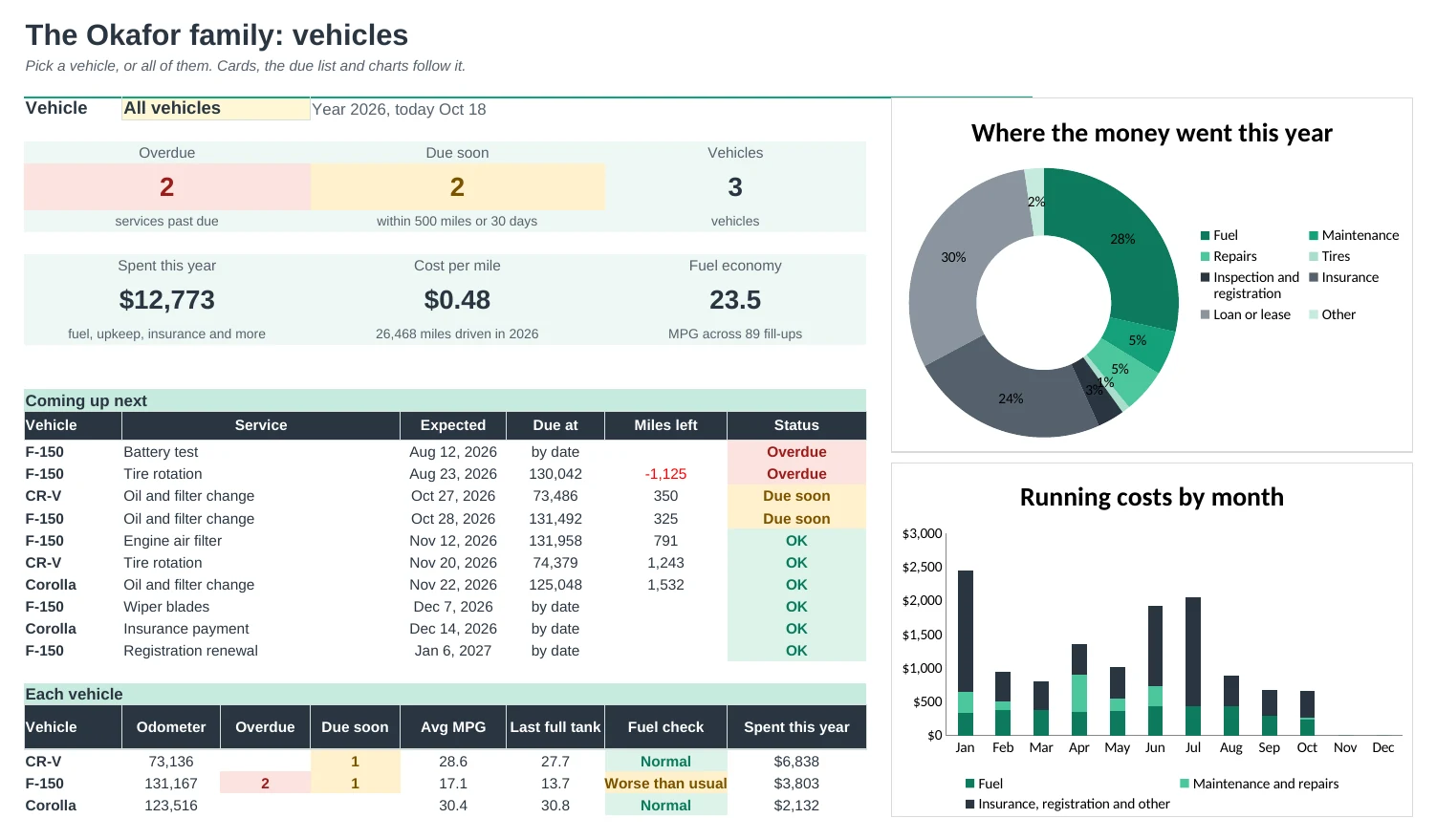
Every car in one workbook: what's due next by miles or months, fuel economy, cost per mile and a service record ready for when you sell.
Know what's due next
Each service is due by miles or by months, whichever comes first. The Dashboard lists the next ten jobs across all your vehicles with an expected date, and flags anything overdue or due soon.
All your vehicles in one place
Add up to ten vehicles once. Every log has a vehicle dropdown, and the Dashboard switches between one vehicle and all of them.
Fuel economy that's right
Log fill-ups with the odometer and economy is worked out between full tanks, so top-ups don't throw it off. A fill-up well below your usual is flagged, which can point to low tires or a dirty filter.
See what each car really costs
Fuel, maintenance, repairs, tires, insurance, registration and loan payments add up by vehicle and by month, with distance driven and cost per mile for the year.
A record buyers trust
Resale Record prints a clean, dated service history with mileage and cost for any vehicle, ready to hand to a buyer or save as a PDF.
Miles or kilometres
Switch to kilometres and litres on Setup and economy shows in L/100 km. Service intervals are yours to change to match your owner's manual.
| Free | Pro |
|---|---|
| Service log | Service log plus a separate fuel log |
| Next due by miles or date | Next due with an expected date from how much you drive |
| Spending per vehicle | Running costs by type, month and cost per mile |
| · | Fuel economy with a drop warning |
| · | Dashboard with charts, pick one vehicle or all |
| · | Printable service record for selling |
| · | Miles and gallons or km and litres |
| · | Insurance, registration and loan costs included |
$19 one-time
9 tabs: Start Here, Dashboard, Schedule, Service Log, Fuel Log, Running Costs, Vehicles, Resale Record and Setup. You get two copies: one filled in with a sample family's three vehicles so you can see it working, and a blank one ready for your own.
Get Vehicle Maintenance Log Pro for $19- Instant download after checkout
- Works in Google Sheets and Excel
- Yours to keep and reuse every year