
Free wedding budget template for Google Sheets
Put in your guest count and budget, then list every cost. Per-guest items like catering and rentals update when your headcount changes, and every deposit and balance gets a due date with an Overdue or Due soon flag. If parents are chipping in, you can see what each person has pledged, what's assigned to them and what they've paid.
Pro Want the version that prices everything all-in and checks your cash month by month? See Wedding Budget Pro →| Item | Value |
|---|---|
| Wedding date | Jun 12, 2027 |
| Today (replace with =TODAY()) | Oct 18, 2026 |
| Guest count | 120 |
| Total budget | $45,000.00 |
| Estimated total | $44,450.00 |
| Contracted or estimated total | $44,960.00 |
| Paid so far | $8,545.00 |
| Still owed | $36,415.00 |
| Left in budget | $40.00 |
| Budget per guest | $375.00 |
| Cost per guest | $374.67 |
| Payments overdue | 1 |
| Due within 30 days or overdue | $1,675.00 |
| Days until the wedding | 237 |
| Category | Item | Vendor | Per guest | Price | Estimated | Actual | Paid by | Paid so far | Still owed | Under or over | Cost per guest |
|---|---|---|---|---|---|---|---|---|---|---|---|
| Venue | Venue rental | Willow Creek Barn | $9,800.00 | $9,800.00 | $9,800.00 | Couple | $3,000.00 | $6,800.00 | $0.00 | $81.67 | |
| Catering | Dinner | Harvest Table Catering | $68.00 | $8,160.00 | $8,400.00 | Maya's parents | $1,500.00 | $6,900.00 | -$240.00 | $70.00 | |
| Catering | Bar package | Harvest Table Catering | $28.00 | $3,360.00 | Daniel's parents | $0.00 | $3,360.00 | $28.00 | |||
| Catering | Service charge and tips | Harvest Table Catering | $1,800.00 | $1,800.00 | Couple | $0.00 | $1,800.00 | $15.00 | |||
| Photo and video | Photographer | Lena Ford Photo | $3,200.00 | $3,200.00 | $3,400.00 | Couple | $1,000.00 | $2,400.00 | -$200.00 | $28.33 | |
| Photo and video | Videographer | $2,200.00 | $2,200.00 | Couple | $0.00 | $2,200.00 | $18.33 | ||||
| Music | DJ | Spin City DJs | $1,500.00 | $1,500.00 | $1,450.00 | Couple | $500.00 | $950.00 | $50.00 | $12.08 | |
| Flowers | Florist | Petal and Stem | $2,400.00 | $2,400.00 | $2,650.00 | Maya's parents | $0.00 | $2,650.00 | -$250.00 | $22.08 | |
| Attire | Wedding dress | Bella Bridal | $1,800.00 | $1,800.00 | $1,650.00 | Maya's parents | $825.00 | $825.00 | $150.00 | $13.75 | |
| Attire | Alterations | Bella Bridal | $300.00 | $300.00 | Maya's parents | $0.00 | $300.00 | $2.50 | |||
| Attire | Suit | Hudson Tailors | $600.00 | $600.00 | $540.00 | Couple | $0.00 | $540.00 | $60.00 | $4.50 | |
| Beauty | Hair and makeup | Glow Studio | $650.00 | $650.00 | $700.00 | Couple | $0.00 | $700.00 | -$50.00 | $5.83 | |
| Cake | Cake | Sweet Rise Bakery | $6.00 | $720.00 | $690.00 | Couple | $0.00 | $690.00 | $30.00 | $5.75 | |
| Stationery | Invitations and save the dates | Paper Lane | $450.00 | $450.00 | Couple | $0.00 | $450.00 | $3.75 | |||
| Rentals | Tables, chairs and linens | Party Rental Co. | $12.00 | $1,440.00 | $1,380.00 | Couple | $0.00 | $1,380.00 | $60.00 | $11.50 | |
| Ceremony | Officiant | Rev. Tom Ellis | $400.00 | $400.00 | $400.00 | Couple | $0.00 | $400.00 | $0.00 | $3.33 | |
| Ceremony | Marriage license | County clerk | $60.00 | $60.00 | $60.00 | Couple | $0.00 | $60.00 | $0.00 | $0.50 | |
| Rings | Wedding rings | Main Street Jewelers | $1,600.00 | $1,600.00 | $1,720.00 | Couple | $1,720.00 | $0.00 | -$120.00 | $14.33 | |
| Extras | Favors | Etsy | $3.00 | $360.00 | Couple | $0.00 | $360.00 | $3.00 | |||
| Extras | Guest shuttle | Valley Shuttle | $650.00 | $650.00 | Daniel's parents | $0.00 | $650.00 | $5.42 | |||
| Extras | Rehearsal dinner | Luca's Trattoria | $1,500.00 | $1,500.00 | Daniel's parents | $0.00 | $1,500.00 | $12.50 | |||
| Other | Buffer for surprises | $1,500.00 | $1,500.00 | Couple | $0.00 | $1,500.00 | $12.50 |
| Due date | Item | Payment | Amount | Paid | Status | In budget | Notes |
|---|---|---|---|---|---|---|---|
| Jul 15, 2026 | Venue rental | Deposit | $3,000.00 | Paid | Yes | ||
| Aug 10, 2026 | Photographer | Retainer | $1,000.00 | Paid | Yes | ||
| Sep 1, 2026 | Dinner | Deposit | $1,500.00 | Paid | Yes | ||
| Sep 20, 2026 | Wedding dress | Deposit | $825.00 | Paid | Yes | ||
| Oct 1, 2026 | DJ | Deposit | $500.00 | Paid | Yes | ||
| Oct 5, 2026 | Wedding rings | Paid in full | $1,720.00 | Paid | Yes | ||
| Oct 10, 2026 | Hair and makeup | Deposit | $200.00 | Overdue | Yes | Venmo to Glow Studio | |
| Oct 25, 2026 | Florist | Deposit | $650.00 | Due soon | Yes | ||
| Nov 15, 2026 | Wedding dress | Balance | $825.00 | Due soon | Yes | Due at first fitting | |
| Dec 15, 2026 | Venue rental | Second payment | $3,400.00 | Upcoming | Yes | ||
| Jan 15, 2027 | Cake | Deposit | $200.00 | Upcoming | Yes | ||
| Feb 1, 2027 | Tables, chairs and linens | Deposit | $400.00 | Upcoming | Yes | ||
| Apr 1, 2027 | Suit | Paid in full | $540.00 | Upcoming | Yes | ||
| May 12, 2027 | Venue rental | Final payment | $3,400.00 | Upcoming | Yes | ||
| May 20, 2027 | Marriage license | Fee | $60.00 | Upcoming | Yes | Check your county's timing | |
| May 29, 2027 | Dinner | Final payment | $6,900.00 | Upcoming | Yes | Final headcount due same day | |
| May 29, 2027 | Photographer | Balance | $2,400.00 | Upcoming | Yes | ||
| May 29, 2027 | Florist | Balance | $2,000.00 | Upcoming | Yes | ||
| Jun 1, 2027 | DJ | Balance | $950.00 | Upcoming | Yes | ||
| Jun 1, 2027 | Officiant | Paid in full | $400.00 | Upcoming | Yes |
| Category | Estimated | Actual or estimate | Paid so far | Still owed | Share of budget | Per guest |
|---|---|---|---|---|---|---|
| Venue | $9,800.00 | $9,800.00 | $3,000.00 | $6,800.00 | 21.8% | $81.67 |
| Catering | $13,320.00 | $13,560.00 | $1,500.00 | $12,060.00 | 30.1% | $113.00 |
| Photo and video | $5,400.00 | $5,600.00 | $1,000.00 | $4,600.00 | 12.4% | $46.67 |
| Music | $1,500.00 | $1,450.00 | $500.00 | $950.00 | 3.2% | $12.08 |
| Flowers | $2,400.00 | $2,650.00 | $0.00 | $2,650.00 | 5.9% | $22.08 |
| Attire | $2,700.00 | $2,490.00 | $825.00 | $1,665.00 | 5.5% | $20.75 |
| Beauty | $650.00 | $700.00 | $0.00 | $700.00 | 1.6% | $5.83 |
| Cake | $720.00 | $690.00 | $0.00 | $690.00 | 1.5% | $5.75 |
| Stationery | $450.00 | $450.00 | $0.00 | $450.00 | 1% | $3.75 |
| Rentals | $1,440.00 | $1,380.00 | $0.00 | $1,380.00 | 3.1% | $11.50 |
| Ceremony | $460.00 | $460.00 | $0.00 | $460.00 | 1% | $3.83 |
| Rings | $1,600.00 | $1,720.00 | $1,720.00 | $0.00 | 3.8% | $14.33 |
| Extras | $2,510.00 | $2,510.00 | $0.00 | $2,510.00 | 5.6% | $20.92 |
| Other | $1,500.00 | $1,500.00 | $0.00 | $1,500.00 | 3.3% | $12.50 |
| Total | $44,450.00 | $44,960.00 | $8,545.00 | $36,415.00 | 99.9% | $374.67 |
| Who | Pledged | Costs assigned | Paid so far | Still owed | Pledge left |
|---|---|---|---|---|---|
| Couple | $26,000.00 | $26,450.00 | $6,220.00 | $20,230.00 | -$450.00 |
| Maya's parents | $13,500.00 | $13,000.00 | $2,325.00 | $10,675.00 | $500.00 |
| Daniel's parents | $5,500.00 | $5,510.00 | $0.00 | $5,510.00 | -$10.00 |
| Total | $45,000.00 | $44,960.00 | $8,545.00 | $36,415.00 | $40.00 |
What's inside
- Estimated vs actual for every line, with how far under or over each one is
- Per-guest pricing for catering, bar, cake and rentals that updates when your guest count changes
- A payment schedule for every deposit and balance, flagged Paid, Overdue, Due soon or Upcoming
- Who's paying: pledges from the couple and each set of parents, what's assigned to each and what's been paid
- Totals by category with share of budget and cost per guest
- A setup tab with money left, still owed, and how much is due in the next 30 days
How to use it
Download your copy
Click "Free download" to save the .xlsx file. It opens in Excel, or in Google Sheets: open a blank sheet (sheets.new) and choose File, then Import, then Upload.
Fill in the setup
On the Setup tab, type your wedding date, guest count and total budget. Replace the Today date with =TODAY() so the payment flags stay current.
List every cost
On the Budget tab, add each item with an estimated price. Tick Per guest for things priced per head, like dinner or rentals, and type the price per guest.
Add actuals as you book
When you sign a contract, type the real total in Actual. The sheet uses the actual price from then on, and Under or over shows the difference from your estimate.
Schedule the payments
On the Payments tab, add each deposit and balance with its due date. Use the same item name as the Budget tab. Tick Paid when it's done.
Agree who pays for what
Fill in Paid by on each budget line and the pledged amounts on Who's Paying. Pledge left shows if anyone has more assigned than they offered.
Tips
Watch the per-guest lines
Food, drinks, rentals and cake usually make up most of a wedding bill. Ten fewer guests can save more than any other single cut. Change the guest count to see it.
Keep a buffer line
Service charges, taxes, delivery fees and tips sneak in late. A buffer of around 5% of your budget stops them from pushing you over.
Put due dates in your calendar
Many final balances land in the last month. Copy each due date from the Payments tab into your phone calendar with a reminder a week before.
Plan the rest of the wedding too
This sheet is just the money. For a dated checklist and vendor contacts, use our wedding planner. For RSVPs and meal choices, use the guest list template.
Questions
How do I make a wedding budget in Google Sheets?
Copy this template, enter your total budget and guest count on the Setup tab, then list every cost on the Budget tab. Add deposits and balances on the Payments tab and the totals update themselves.
How do I work out cost per guest?
The Setup tab divides your total cost by your guest count. The Budget and By Category tabs also show cost per guest for each line, so you can see where the money per head goes.
What's the difference between estimated and actual?
Estimated is your guess before booking. Actual is the price on the contract. Once you type an actual, the sheet uses it for totals, payments still owed and who's paying.
Can I track who's paying for what?
Yes. Choose who pays on each budget line, and add each person's pledged amount on the Who's Paying tab. It shows what's assigned to them, what they've paid and what's left.
How is this different from your wedding planner?
The wedding planner covers the whole wedding with a checklist, vendors and a simple budget. This one goes deeper on money: per-guest pricing, a full payment schedule and split costs.
Is it free?
Yes. Download the .xlsx file and open it in Excel or Google Sheets. No sign-up. Share it with your partner or parents so everyone sees the same numbers.
Pro version
Wedding Budget Pro
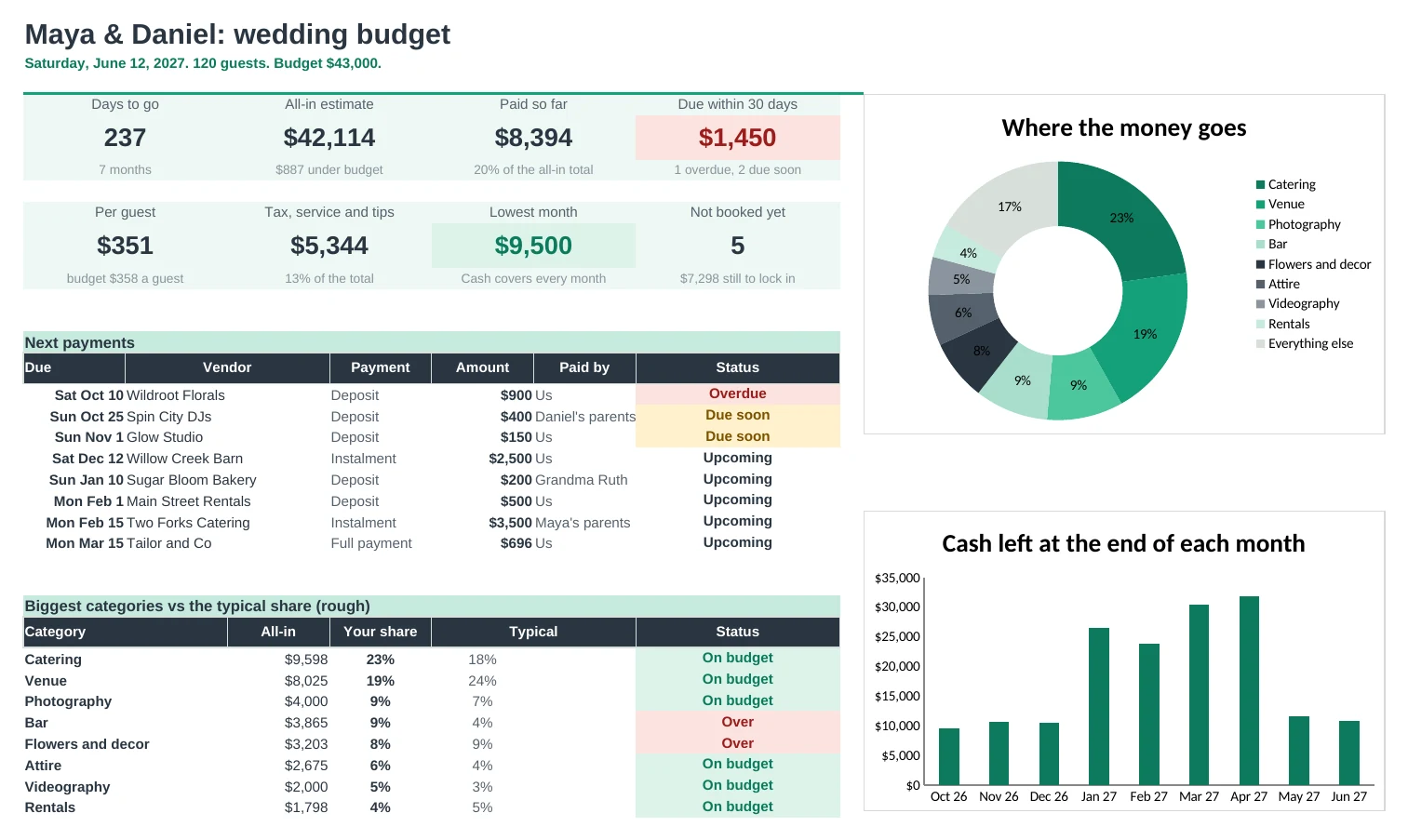
Every cost priced all-in with tax, service charge and tips, every payment on a schedule, and a month-by-month check that the money arrives before the bills do.
No surprise service charges
Price each cost per guest, per item or flat, and say whether tax and the service charge apply. The all-in total includes them, plus tips, so the final bill matches the plan.
Compare quotes fairly
Put quotes side by side the same way: extras, deposit, tax and service included. The cheapest in each category is marked, and so is anything over what you planned.
Every payment on a schedule
Deposits, instalments and final balances each get a due date and a payer. Overdue and due-soon payments stand out, and Costs tells you if part of a bill isn't scheduled yet.
Know the cash is there
Cash Flow runs month by month to the wedding: your savings and family gifts in, payments out, and a warning for any month that comes up short.
See what each guest costs
Guest Count shows the total at 60 to 200 guests, so you know what trimming or growing the list really means.
Clear on who pays what
Who's Paying shows what each person is giving, what's assigned to them and what they've paid. Tips becomes a numbered envelope list for the day.
| Free | Pro |
|---|---|
| Estimated vs actual | All-in costs with tax, service charge and tips |
| Cost per guest | Guest count table from 60 to 200 guests |
| Payments with due dates | Payment schedule with payers and unscheduled checks |
| Who's paying | Who's paying: giving, assigned, paid and left |
| · | Quote comparison with the cheapest marked |
| · | Month-by-month cash flow to the wedding |
| · | Typical share by category (rough guide) |
| · | Tip envelope list and tipping guide |
$19 one-time
11 tabs: Start Here, Dashboard, Costs, Budget, Quotes, Payments, Cash Flow, Who's Paying, Guest Count, Tips and Setup. You get two copies: one filled in with a sample wedding so you can see it working, and a blank one ready for your own numbers.
Get Wedding Budget Pro for $19- Instant download after checkout
- Works in Google Sheets and Excel
- Yours to keep and reuse every year