
Free wedding guest list template for Google Sheets
Keep every guest in one list, from mailing addresses to meal choices. As RSVPs come in, the summary shows who's coming, who hasn't replied and how many of each meal to order. A tables tab tells you how many seats are left at each table.
| Household (as addressed) | Guest names | Side | Group | Mailing address | Email or phone | Invited | Plus-one | RSVP | Attending | Chicken | Salmon | Vegetarian | Kids meal | Meals | Dietary notes | Table | Thank-you sent |
|---|---|---|---|---|---|---|---|---|---|---|---|---|---|---|---|---|---|
| Mr. and Mrs. Robert Chen | Robert, Linda | Maya | Family | 418 Elm St, Portland, OR 97214 | (503) 555-0142 | 2 | No | Yes | 2 | 1 | 1 | 0 | 0 | OK | 1 | ||
| The Chen Family | Kevin, Amy, Lily (6), Max (4) | Maya | Family | 92 Birch Ave, Seattle, WA 98103 | kevin.chen@email.com | 4 | No | Yes | 4 | 1 | 0 | 1 | 2 | OK | Lily: no nuts | 1 | |
| Grandma Ruth Chen | Ruth | Maya | Family | 15 Oak Ln, Portland, OR 97219 | (503) 555-0188 | 1 | No | Yes | 1 | 0 | 0 | 1 | 0 | OK | Soft foods, near the exit | 1 | |
| Ms. Priya Raman and Guest | Priya, guest | Maya | Friends | 2201 Pine St #4, Portland, OR 97205 | priya.r@email.com | 2 | Yes | Yes | 2 | 0 | 1 | 1 | 0 | OK | 4 | ||
| Ms. Jordan Ellis | Jordan | Maya | Work | 77 Market St, Portland, OR 97201 | jordan.ellis@email.com | 1 | No | No | 0 | 0 | 0 | 0 | 0 | ||||
| Mr. and Mrs. Tom Brooks | Tom, Karen | Daniel | Family | 301 Maple Dr, Boise, ID 83702 | (208) 555-0119 | 2 | No | Yes | 2 | 1 | 1 | 0 | 0 | OK | 2 | ||
| The Brooks Family | Sean, Erin, Owen (9) | Daniel | Family | 55 Cedar Ct, Boise, ID 83706 | sean.brooks@email.com | 3 | No | Pending | 0 | 0 | 0 | 0 | 0 | ||||
| Mr. Luis Ortega | Luis | Daniel | Friends | 1408 River Rd, Denver, CO 80211 | luis.ortega@email.com | 1 | No | Yes | 1 | 1 | 0 | 0 | 0 | OK | 5 | ||
| Mr. Ben Carter and Guest | Ben, guest | Daniel | Friends | 66 Lake St, Denver, CO 80205 | (720) 555-0177 | 2 | Yes | Yes | 2 | 1 | 0 | 0 | 0 | Check | Guest is gluten free | 5 | |
| Ms. Hannah Wu and Mr. Alex Park | Hannah, Alex | Both | Friends | 930 Hawthorne Blvd, Portland, OR 97214 | hannah.wu@email.com | 2 | No | Yes | 2 | 0 | 1 | 1 | 0 | OK | Alex: vegetarian | 4 | |
| Mr. and Mrs. Mark Davis | Mark, Julie | Daniel | Work | 12 Summit Way, Denver, CO 80220 | mark.davis@email.com | 2 | No | No | 0 | 0 | 0 | 0 | 0 | ||||
| Ms. Olivia Grant | Olivia | Both | Friends | 480 NW 23rd Ave, Portland, OR 97210 | (971) 555-0163 | 1 | No | Pending | 0 | 0 | 0 | 0 | 0 |
| What | Households | Guests |
|---|---|---|
| Invited | 12 | 23 |
| Said yes | 8 | 16 |
| Said no | 2 | 3 |
| Waiting to hear | 2 | 4 |
| Replied so far | 83.3% | 82.6% |
| Maya's side | 5 | 10 |
| Daniel's side | 5 | 10 |
| Both | 2 | 3 |
| Chicken meals | 5 | |
| Salmon meals | 4 | |
| Vegetarian meals | 4 | |
| Kids meals | 2 | |
| Meal rows to check | 1 | |
| Thank-you notes left | 6 |
| Table | Seats | Seated | Open seats |
|---|---|---|---|
| 1 | 8 | 7 | 1 |
| 2 | 8 | 2 | 6 |
| 3 | 8 | 0 | 8 |
| 4 | 8 | 4 | 4 |
| 5 | 8 | 3 | 5 |
| 6 | 10 | 0 | 10 |
| Total | 50 | 16 | 34 |
| Not seated yet | 0 |
What's inside
- One row per household, with names, mailing address and contact, ready for invitations
- RSVP, number attending and plus-ones tracked for every invite
- Meal counts for each choice, plus a flag when a household's meals don't add up to its headcount
- A summary with yes, no and waiting counts, reply rate, and guests by side
- A tables tab that shows seats filled and seats open at each table
- Thank-you note checkboxes, so nobody gets missed after the wedding
How to use it
Make your copy
Click "Make a copy" to save the list to your Google Drive, or download the Excel file. Clear the sample guests.
Put in your names
In the Side column, use your own first names or "Both". Then change "Maya" and "Daniel" inside the formulas on the two side rows of the Summary tab to match.
Add every household
One row per invitation. Put the total people invited, including any plus-one, in Invited. Address it the way it should look on the envelope.
Track RSVPs
As replies come in, set RSVP to Yes, No or Pending, fill in how many are attending, and put a number under each meal they chose.
Seat your guests
Type a table number for each household that said yes. The Tables tab shows how many seats are left and how many guests still need a table.
Tips
Use Yes, No and Pending exactly
The summary counts those three words. To make it foolproof, select the RSVP column and add a dropdown with Data > Data validation.
Watch the Meals column
If a household says yes but their meal numbers don't add up to Attending, the Meals column says "Check". Fix those before you send counts to the caterer.
Print address labels
Download the sheet as a .csv file and use it with the Avery label tool or Word mail merge. The Household and Mailing address columns are set up for that.
Share with one helper at a time
Give a parent or planner edit access so they can add their side of the list. Use version history if anything gets changed by mistake.
Questions
How do I make a wedding guest list in Google Sheets?
Make a copy of this template and add one row per household you're inviting. Fill in the number invited, then update RSVP, attending and meals as replies arrive. The summary does the counting.
How do I count plus-ones?
Mark Plus-one as Yes and include the extra person in Invited. If they come, include them in Attending and give them a meal like any other guest.
How do I get meal counts for the caterer?
Look at the meal rows on the Summary tab. They add up every Yes household's meal numbers. Check that "Meal rows to check" is 0 first.
Can my partner and I both edit the list?
Yes. Click Share and add your partner as an editor. You'll both see changes as they happen, on a phone or a computer.
Can I change the meal options?
Yes. Rename the four meal column headers and the matching rows on the Summary tab. The formulas don't care what the meals are called.
Is this wedding guest list free?
Yes. Copy it to your Google Drive or download the Excel file. There's no sign-up.
Pro version
Wedding Guest List Pro
The guest list that tracks every household and every guest, then builds your seating chart, caterer counts and address labels for you.
Households and guests, both done right
Invitations go to households, but meals and seats are per person. Type each envelope once on Households and each person on Guests, and every count adds up.
Know who's coming at a glance
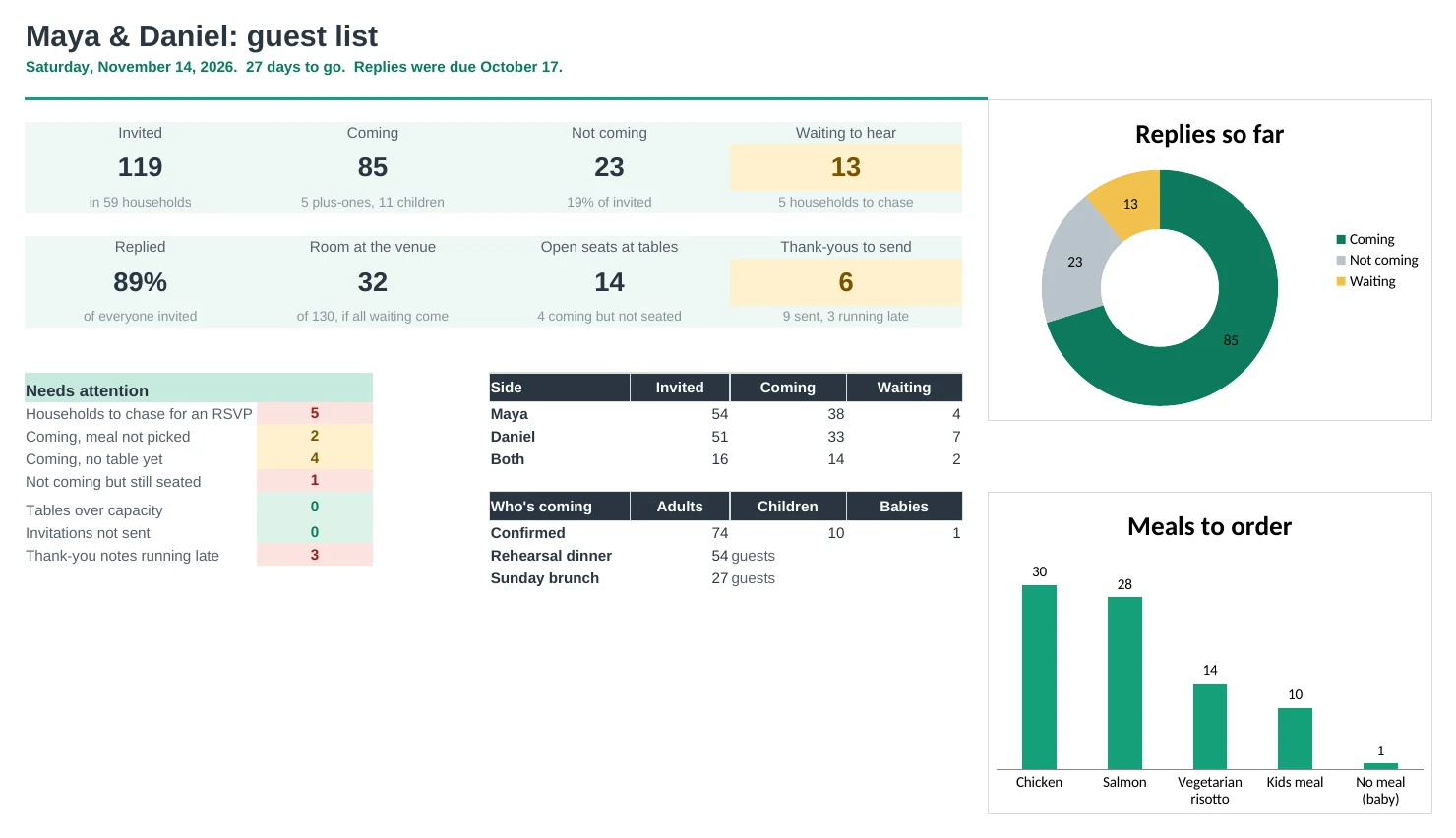
The Dashboard shows who's coming, who said no and who you're still waiting on, with the households to chase once the RSVP date passes.
A seating chart that builds itself
Pick a table for each guest and the Seating Chart fills in, with open seats, full tables and anyone over capacity flagged. Print it for the venue.
Everything the caterer asks for
Meal counts, a cost estimate from your price per plate, meals by table, and every dietary need and allergy in one list.
Address labels without retyping
Every invited household with an address appears on the Labels tab, three across and ready to print.
Thank-you notes on time
Note each gift and the date it arrived. A note that's running late turns red, so nobody gets missed.
| Free | Pro |
|---|---|
| One row per household | Households for envelopes, a row per guest for meals and seats |
| RSVP yes or no | Coming, not coming, waiting, and who to chase after the deadline |
| Meal columns to fill in | Meal per guest, counts, cost estimate and meals by table |
| Seats left per table | Printable seating chart with open seats and over-capacity flags |
| · | Dietary needs and allergies list for the caterer |
| · | Address labels, three across |
| · | Gift and thank-you tracking with late flags |
| · | Dashboard with charts, plus rehearsal dinner and other event counts |
$19 one-time
9 tabs: Start Here, Dashboard, Households, Guests, Tables, Seating Chart, Meals, Labels and Setup. You get two copies: one filled in with a sample wedding of 121 guests so you can see it working, and a blank one ready for your own list.
Get Wedding Guest List Pro for $19- Instant download after checkout
- Works in Google Sheets and Excel
- Yours to keep and reuse every year